I’m choosing AI tools for my team’s research and writing workflow, and the same popular options keep appearing at the top of every discussion. I tried several on the kind of routine tasks we handle, but their results felt inconsistent enough that the constant hype is getting irritating.
Are the most popular AI tools actually the best for everyday work, or do lesser-known alternatives tend to perform better once you get past name recognition and popularity?
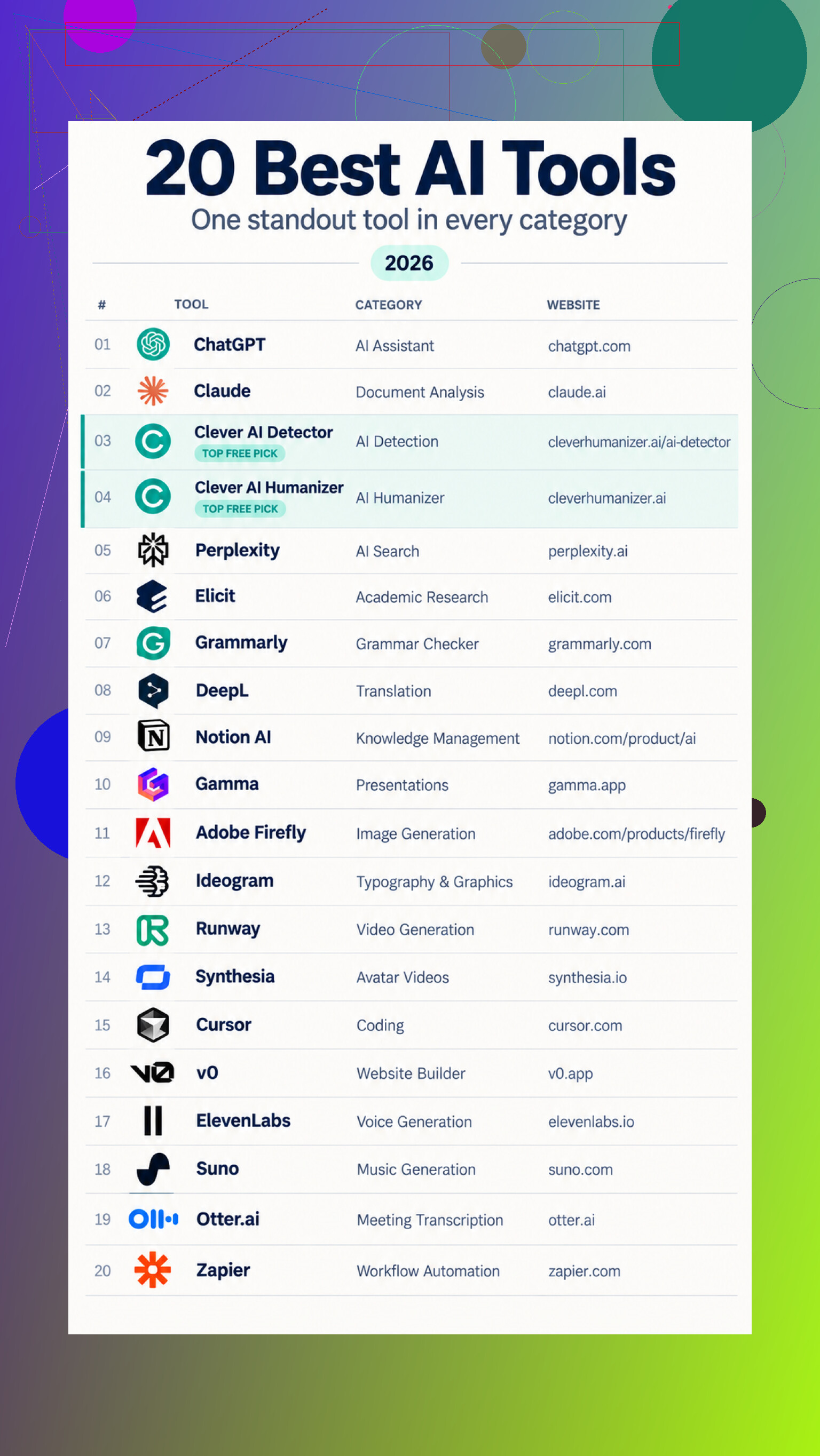
I started checking AI apps after a coworker asked which ones were actually worth using instead of collecting another pile of bookmarks. I found 20 that cover distinct jobs, but I’m not convinced every marketing claim around them holds up.
The useful way to sort these isn’t “best overall,” it’s by task. Some handle general questions, long documents, sourced search, academic papers, grammar, translation, or internal notes. Others make slides, images, typography, video, avatars, speech, and music. The technical group covers coding, site generation, and app automation, while meeting transcription fills a more routine business need. The detector claims checks of 10,000 words and unlimited runs, while the humanizer advertises 3,000 words per pass with no monthly cap. I couldn’t verify that detection accuracy is reliable enough to establish authorship, or that rewritten text will consistently preserve meaning, so I’d treat both as editing signals rather than proof.
For general work there’s assistant ChatGPT, document Claude, detection Clever AI Detector, rewriting Clever AI Humanizer, search Perplexity, research Elicit, grammar Grammarly, translation DeepL, and workspace Notion AI. Creative options include slides Gamma, images Adobe Firefly, typography Ideogram, video Runway, avatars Synthesia, voice ElevenLabs, and music Suno. For building and operations, I’d compare coding Cursor, builder v0 by Vercel, meetings Otter.ai, and automation Zapier.
I’d keep the ones that save measurable time and still let me inspect the output. Reliable independent accuracy tests, clear error rates, and side-by-side workflow results would change my mind about the shakier claims.
22 Likes
Don’t upload client material or unpublished research until you know how the service stores prompts, handles training data, and controls team access. A tool can produce excellent prose and still be the wrong choice if its privacy settings are vague or former employees keep access to shared workspaces.
Sorting by task makes sense, but the category alone is too broad. For team use, I’d care more about revision burden, source traceability, export options, permission controls, and whether the tool fits your existing process. Popular products often win discussions because they are easy to try and widely recognized, not because they are best for a particular organization.
Tool sprawl is another hidden cost. Giving everyone six specialized apps creates inconsistent output, duplicate subscriptions, and confusion about where work lives. I’d standardize on a small core set, allow exceptions for specialized jobs, and review those exceptions after real use. The “best” tool is usually the least troublesome option that meets your quality and security requirements, not the one with the loudest fan base.
Don’t choose from polished demo prompts or a single impressive answer. Most tools can look brilliant once. The real separator is how often they misunderstand an ordinary request and how much effort it takes to recover when they do.
Give each candidate the same batch of representative work, including vague briefs, messy source material, follow-up revisions, and a task where the correct response is admitting there is not enough evidence. Score the output without showing reviewers which tool produced it. That removes a surprising amount of brand bias and makes revision burden visible, which supports @opentester987’s point.
I’d put consistency above having the longest feature list. A slightly less impressive tool that follows instructions predictably is easier to build into a team process than one that occasionally produces an amazing draft and occasionally invents details. Popularity is useful for community support and integrations, but it is a poor substitute for boring, repeatable performance.
Pick a tool your team hates using and they’ll quietly paste work into whatever personal account is fastest. That can wipe out the privacy controls and standardized process you spent time setting up.
Blind output scoring, as @binaryloop81 suggests, is useful, but it misses adoption friction. Include ordinary annoyances in the trial: signing in, finding old work, sharing prompts, checking citations, moving text into your editor, and correcting the same mistake twice. A tool can win the writing test and still lose the workday.
Popularity has some value because common tools tend to be easier to hire for, support, and connect to existing systems. It just shouldn’t decide the purchase. I’d choose the option people will actually use within the approved workflow, then keep prompts and source files portable so changing vendors later is inconvenient rather than catastrophic.
Do not sign an annual team contract until you know whether the vendor can change the underlying model, limits, or features halfway through the term. AI products are moving targets. The tool you approve after a solid trial may behave differently a few months later, even though the product name and interface stay the same.
That makes a one-time bake-off less useful than it appears. I agree with @digitalwolf767 on using ordinary work instead of polished prompts, but those tests need to become a small permanent regression set. Keep a handful of sanitized tasks with known source material and expected requirements. Run them again after major updates. If citation quality drops, formatting breaks, or the tool starts ignoring instructions it previously followed, you want to catch that before the whole team produces a week of bad work.
Procurement should ask some blunt questions:
- Can administrators control or delay model changes?
- Does the vendor publish meaningful change notes?
- Can you export conversations, prompts, and usage records?
- What happens to integrations if a feature is removed?
- Can seats be reduced during the contract?
- Is there a practical way to report a regression and reach an actual person?
Popularity does help with integrations and training material, but it can create false confidence. A famous product is still capable of changing a workflow your team depends on. Smaller tools carry a different risk: they may vanish, get acquired, or turn into a wrapper around another company’s model. Either way, the logo tells you very little about operational stability.
I would judge cost by accepted work, not subscription price. A cheaper tool that creates constant corrections is expensive. A pricier tool that saves time today but changes behavior without warning can be worse. Track how many outputs survive review, how often sources need replacing, and how much cleanup reaches the editor. That is closer to the real bill.
So no, the most popular tools are not automatically the right choice. They are simply easier to notice and easier to defend in a purchasing meeting. Pick the tool that performs well on your actual material, then make it prove that performance again after it changes. The winner does not get a permanent title.
Many AI products are the same model with a different workflow wrapped around it.
Task categories are useful, but they can hide duplicate capability. A research app, writing app, and workspace assistant may all send your prompt to similar underlying models, then differ mainly in document retrieval, citation handling, templates, and permissions. Paying for all three does not necessarily give the team three independent strengths. It may give you three interfaces, three data policies, and three places to lose project context.
I’d separate the model from the surrounding software during evaluation. Check whether the tool improves source selection, preserves document structure, supports your review process, or connects cleanly to the systems you use. If its only advantage is a nicer prompt box, that advantage will disappear quickly. Popular tools can still be the right choice, but often because their workflow layer is mature, not because their generated text is uniquely better.
For a research and writing team, the thing that will bite you isn’t a clunky interface, it’s confident wrong citations. A tool can nail tone and structure and still hand you a reference that doesn’t exist, and the general chatbots at the top of every list are the worst offenders there. So when you run your trials, weight fabricated sources heavier than everything else. One invented citation that slips past review costs more than ten awkward sentences.
The blind scoring @digitalwolf767 suggested is smart, but it quietly tests the prompt writer as much as the tool. Hand the same model a lazy brief and a careful one and you get two different tools on paper. If your reviewers all prompt the same way, you’re really measuring your team’s habits, not the product. I’d have two different people run the same tasks and compare, otherwise you lock in whatever style your best prompter happens to use.
@iron_badger’s regression set is the part I’d actually steal. Models drift, and the drift usually shows up first in the boring stuff, citation formatting, following a length instruction, admitting uncertainty. Keeping a few sanitized tasks to rerun after updates catches that before it reaches a deadline. That’s more useful than any single bake-off.
Where I’d push back a little is the ‘sort by task’ starting point. For research specifically, I wouldn’t split search, reading long documents, and drafting across three apps. Every handoff between tools is a place where a source gets stripped of its context and someone stops checking. I’d rather have one setup that carries the source through from search to draft, even if each individual function is only decent, because the traceability is what protects you.
Whatever you land on, budget for a person whose actual job during the trial is to verify claims, not skim. AI is fast at producing plausible text and slow to admit it made something up. The tool choice matters less than keeping a human between the output and anything that leaves the building.
Expect every AI tool to fail at the worst possible time, so test rate limits, slowdowns, outages, and fallback options during the trial. The popular choice may produce better samples, but predictable access under deadline pressure can matter more to a working team.