I accidentally deleted important files from my Mac and emptied the Trash before realizing I still needed them. I’m looking for reliable Mac data recovery software that can recover lost documents and photos without causing more damage. What has worked for you?
I ran into this after I wiped an external SSD during a macOS reinstall. Dumb mistake, long night. I tested a pile of recovery apps after, and the one I kept coming back to was Disk Drill. For me, it hit the least annoying mix of scan speed, file quality, and basic ease of use.
A lot of Mac recovery apps look clean in screenshots, then fall apart once you start a real scan. I saw slow scans, broken previews, and weird APFS support more than once. Disk Drill handled newer Macs better than most of what I tried. It runs native on Apple Silicon, reads APFS, HFS+, and exFAT, and the steps are simple enough if this is your first time doing recovery.
The preview part mattered more than I expected. Before paying, I opened recovered docs, photos, videos, and even PSDs to check if they were usable. Some apps will show you a giant list of ‘found’ files, then half of them are broken junk. Seeing the file open first saved me from wasting money.
A few extras stood out because they were useful, not filler:
Stuff I ended up using
- Byte-to-byte disk backup for unstable drives
- S.M.A.R.T. monitoring
- Duplicate cleanup
- Recovery Vault protection
- Advanced Camera Recovery for split or fragmented video files
The disk image feature alone made me keep it installed. If your drive is clicking, dropping connection, or acting strange, clone it first. I learned this a bit too late on an older portable drive. Scanning a bad disk over and over is how you make a bad day worse.
Where the other tools fit
If you deal with RAID, broken partitions, or NAS boxes, R-Studio deserves a look. I tried it too. It felt fast and serious, like software made by people who assume you already know what a filesystem header is. I would not hand it to a casual user unless they like digging through dense menus and low-level details.
iBoysoft Data Recovery did better than I expected with APFS. I spent around an hour with it and the recovery results were decent. My issue was the pricing. It kept steering me toward a subscription, and I don’t love software tied up like tht.
PhotoRec still has a place if free matters more than convenience. It works, sort of in its own harsh way. You get signature-based recovery, so files often come back without original names or folder structure. On a large drive, cleanup turns into a chore fast. I would only use it if budget is the main limit and you’re ready for manual sorting after.
What matters more than the app
This part gets skipped too often. Recovery success depends a lot on what you do right after the loss.
If you keep using the Mac like nothing happened, especially with SSDs, your odds drop fast. New writes overwrite old data. Once those blocks are gone, they are gone.
So if you lost something important, do this first:
- Stop using the drive
- Do not install recovery software onto the same drive
- Restore recovered files to another drive
- If the disk is unstable, make an image backup before scanning
From what I saw, this changes your results more than swapping between two decent recovery apps.
8 Likes
If you emptied Trash on a Mac, I’d look at Disk Drill first. It’s the easiest pick for most people, but I don’t fully agree with @mikeappsreviewer on one point, scan speed matters less than file integrity. I’d rather wait longer and get clean docs and photos back.
What I’d compare:
- APFS support
- Preview before recovery
- Recovery to another drive
- Read-only scan behavior
- Clear file filters for photos, PDFs, docs
Disk Drill does those well on macOS. That’s why it gets recommended so often for Mac data recovery software. Ease of use matters when you’re stressed and trying not to make it worse.
If you want alternatives, Data Rescue and R-Studio are worth a look. R-Studio is strong, but it feels built for people who already know what they’re doing. PhotoRec is free, but the file names and folder structure are often a mess. It works, but cleanup is annoyng.
One more thing. If your Mac uses an SSD, deleted files get harder to recover fast because of TRIM. So stop using the drive now. Recover to an external drive, not back to the Mac.
If you want a solid roundup, this thread is useful for best Mac data recovery software picks and user comparisons:
best Mac data recovery software recommendations from Reddit users
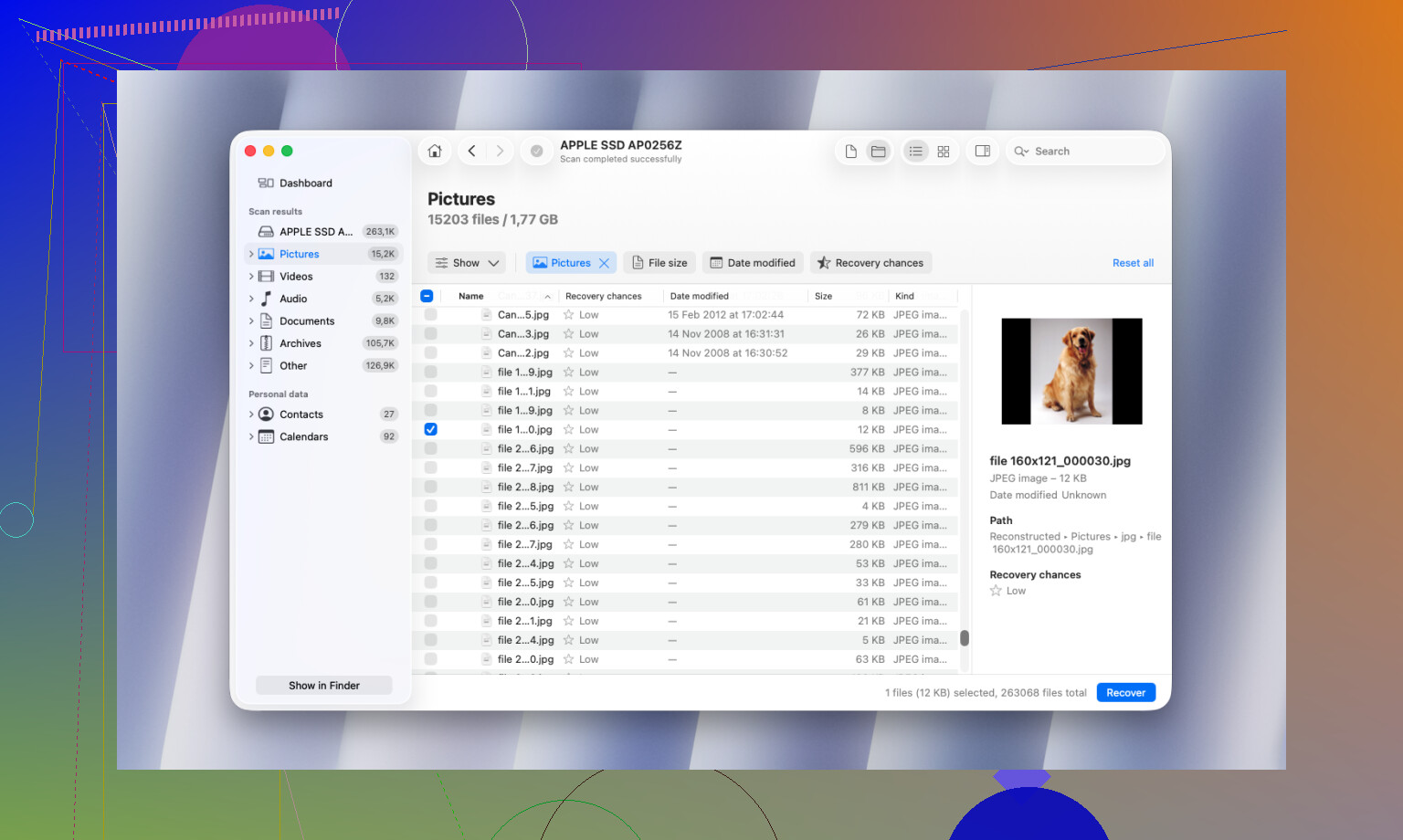
If this is a regular accidental delete + emptied Trash situation, I’d put Disk Drill near the top for Mac data recovery software, mostly because it’s less fiddly than a lot of the “pro” tools. I don’t totally agree with @mikeappsreviewer that scan speed should be a major selling point though. On a Mac, especially with photos and documents, I care way more about whether the recovered files actually open and keep their structure.
One thing I’d add that @cacadordeestrelas only hinted at: if your deleted files were on your internal SSD, your odds can be rough because of TRIM. That means even the best Mac file recovery app can come up empty. So don’t judge the software too hard if the drive itself already cleaned house.
My short list:
- Disk Drill for easiest all-around Mac recovery
- R-Studio if you’re more technical
- PhotoRec if free matters more than convenience
Also, don’t recover back onto the same Mac volume. That’s how people turn “maybe recoverable” into “welp, it’s gone.”
If you want a simple explainer, this Mac data recovery software Reel with tips for deleted files is pretty easy to skim. Disk Drill is probably the safest place to start tbh.
I’d start with Disk Drill, but with one caveat: if the files were deleted from your Mac’s internal SSD, software may not save you because TRIM can wipe recoverable traces fast.
Pros of Disk Drill
- Very easy to use
- Good APFS and external drive support
- File preview is actually helpful
- Lets you save recovered files to another disk
- Nice filters for photos, docs, archives
Cons
- Not the cheapest option
- Deep scans can take a while
- On severely damaged drives, it’s not as forensic-feeling as R-Studio
- Recovery quality still depends heavily on the drive state
I slightly disagree with the “just use the easiest app” angle from @cacadordeestrelas and @suenodelbosque. Ease matters, sure, but on Macs I care more about whether recovered files open correctly than how pretty the interface is. @mikeappsreviewer was right to bring up testing, though.
If you want alternatives:
- R-Studio for advanced cases
- Data Rescue for a more traditional Mac-focused option
- PhotoRec if free is the priority and you can live with messy filenames
Best case for recovery is usually an external drive, SD card, or USB stick. Worst case is the internal SSD after heavy use. If it’s important enough, stop using the Mac and scan from another boot drive or another machine.