I keep seeing “serial to Ethernet” adapters recommended for connecting older RS-232/RS-485 equipment to modern networks, but I’m still confused about how this technology actually works in practice. Does it just tunnel serial data over TCP/IP, or does it emulate a COM port on a PC, or both? I’m trying to figure out what I need to reliably remote-manage legacy industrial devices over Ethernet without rewriting existing software. Can someone break down what serial to Ethernet technology is, typical use cases, and what to watch out for with latency, drivers, and security?
It’s not magic, it’s just tunneling bytes with some extra options bolted on.
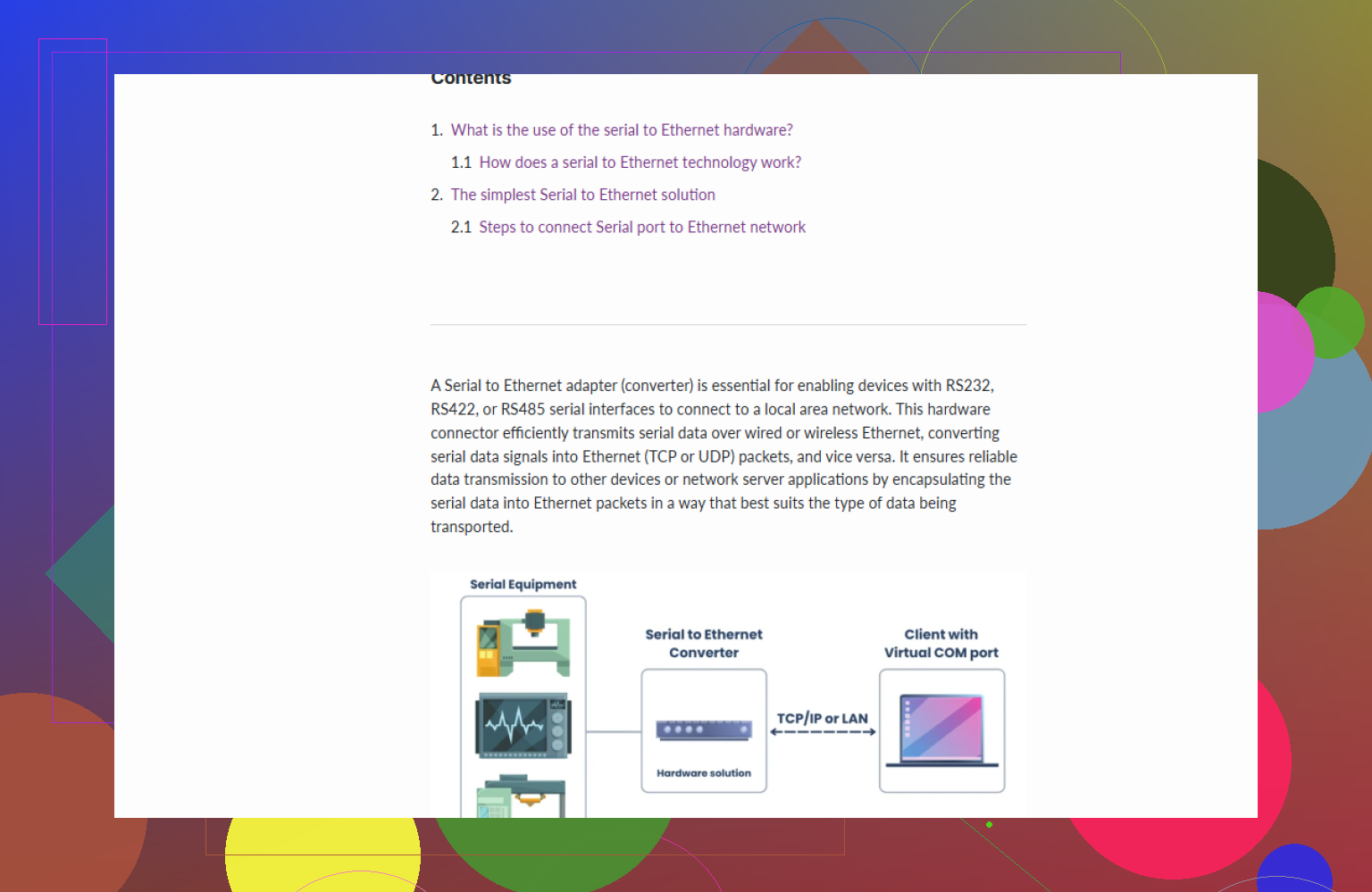
At a high level, a serial to Ethernet device (or software like Serial to Ethernet Connector) takes raw serial data from RS-232 / RS-485 / RS-422 and wraps it in TCP or UDP so it can ride over an IP network. On the other end, something unwraps it and presents it as a serial port again or just processes the bytes directly.
There are three common real-world ways this works:
-
Virtual COM port to device server
- On a Windows or Linux PC you install a driver that creates a virtual COM port.
- That driver opens a TCP connection to the serial device server (the little box with RS-232 on one side, RJ45 on the other).
- The OS and the legacy app think they are talking to COM3, 9600,n,8,1 like always.
- In reality those bytes go through Ethernet to the box, then out the DB9 or screw terminals to your old hardware.
This is what Serial to Ethernet Connector does in software only: it shares a local serial port over the network so another machine can use it like it was plugged in locally.
-
TCP “raw socket” mode
- The box listens on a TCP port, say 4001.
- Your app directly opens a TCP socket to 192.168.1.50:4001 and reads/writes bytes.
- The device server just pushes those bytes to its serial port and vice versa.
No virtual COM port here. Great for custom or modern software that you control.
-
Serial device as a network client
- Some boxes can initiate outgoing TCP connections to a server instead of waiting for incoming.
- Useful when the serial device is behind NAT or in a remote plant where you cannot open inbound ports.
- The server app just waits for connections, then treats that as the serial link.
What it does not do by itself:
- It does not magically convert an old proprietary serial protocol into Modbus TCP, OPC UA, BACnet/IP, etc unless the device explicitly has protocol conversion features. Many simple adapters just move bytes.
- It does not “speed up” the serial protocol. If your serial device is 9600 baud and chatty, it stays 9600 baud and chatty. Ethernet just makes the cable longer and the routing flexible.
So in practice:
- Have ancient scale / barcode scanner / PLC with RS-232 on the plant floor.
- Run Ethernet fiber all over instead of miles of RS-485.
- Drop a serial to Ethernet box at each legacy device, point your SCADA / logging app to those IPs or virtual COMs, and suddenly 1998 hardware is visible on a modern IP network.
You specifically asked “does it just tunnel serial over TCP?”
Mostly yes. Think: serial bytes in, TCP packet out, repeat. The details depend on configuration:
- TCP vs UDP: TCP is most common, UDP used where latency matters more than reliability.
- Connection behavior: Server mode vs client mode, keepalives, timeouts, etc.
- Framing options: Some boxes let you define idle timers, packet sizes, delimiters so the remote side can reconstruct messages cleanly.
If you want a software based approach that can share or redirect real or virtual COM ports over the network, look at Serial to Ethernet Connector. It lets you create virtual serial ports, map them over TCP/IP and make old serial apps run against remote hardware without rewriting anything.
If you want a clearer walkthrough, config examples and diagrams, this guide is actually pretty solid:
learn how to connect legacy serial devices over Ethernet
That covers typical setups, modes, and how people use this in real-world industrial and lab setups.
13 Likes
It mostly does tunnel serial over TCP/IP like @nachtdromer said, but that description hides a bunch of real‑world “gotchas” you’re going to hit as soon as you plug this stuff into an actual plant or lab.
Think of three layers:
-
Electrical layer
RS‑232 / RS‑485 / RS‑422 are just voltage levels, distances, and wiring rules. Serial to Ethernet boxes handle:- RS‑232: point to point, short distance, single device
- RS‑485: multi‑drop bus, usually half duplex
- Termination, biasing, grounding, isolation, etc.
Ethernet on the other side is its own electrical world. The converter is literally acting as a protocol bouncer between two physical universes.
-
Byte transport layer
Here is where it really is a tunnel, but not as trivial as “serial bytes in, TCP out”:- Serial is a stream of bytes with no inherent message boundaries.
- IP/TCP is packets. Something has to decide: “how many serial bytes go into one TCP segment” and “when do I flush”.
That leads to: - Idle timeouts (flush a packet after X ms of silence)
- Fixed packet sizes
- Delimiter based packing (send when you see
0x0Dor whatever)
If you do this wrong, your legacy protocol might still “work” but perform horribly or break in weird ways. This is where I slightly disagree with the simplified “just moves bytes” line. Yes, it moves bytes, but framing settings can absolutely make or break certain serial protocols in practice.
-
Application / protocol layer
This is where people get burned the most. The converter usually does not understand your protocol:- Modbus RTU over serial vs Modbus TCP over Ethernet are different protocols even if the data looks related. You do not get Modbus TCP “for free” unless the device explicitly supports RTU/TCP conversion.
- Old proprietary PLC drivers often rely on timing quirks or bus arbitration behavior on RS‑485. Once you put that over a routed network with jitter, VPNs, Wi‑Fi, etc, the driver can start failing in non obvious ways.
So, in real‑world use, you end up asking:
- Where is the “real” serial port from the software’s point of view?
- With a hardware device server plus a virtual COM port driver, Windows apps see COM4 like always, but that COM4 is actually talking TCP to the box. This is what tools like Serial to Ethernet Connector do entirely in software when you share a serial port from one machine to another.
- How much network garbage can I tolerate?
- For SCADA polling every few seconds, TCP over a LAN is usually fine.
- For super tight motion control with millisecond timing, sticking a random Ethernet tunnel between the controller and the drive is often a disaster.
- Point to point vs many to one vs one to many:
- Some device servers support multiple TCP clients attached to the same serial port. That sounds handy for monitoring, but can break protocols that assume only one master.
- Others can “pair” two boxes so they behave like a long serial cable over IP. That is closer to a transparent tunnel and often safer for weird legacy gear.
Concrete example from the field:
- Old RS‑485 power meters on a Modbus RTU daisy chain
- New energy management server in a data center somewhere else
- You drop in a 4‑port RS‑485 to Ethernet server in the electrical room
- Configure each serial port at 9600, 8N1, Modbus‑friendly packing (e.g. flush packets after 5 ms idle)
- On the server, either:
- Run a Modbus RTU‑over‑TCP capable driver and hit IP:port directly, or
- Install Serial to Ethernet Connector or the vendor’s virtual COM driver so your existing “COM3” based Modbus tool keeps working without code changes
A couple more real‑world issues no one mentions in marketing blurbs:
- Flow control & buffering:
If the serial end is slow and the network side is fast, the box needs enough buffering and proper RTS/CTS or XON/XOFF handling. Cheap boxes often skimp here, and you see random data loss under load. - Reconnection logic:
What happens if the network link drops? Some boxes hold the serial port “frozen,” others dump the buffer, others keep sending into the void. Your app needs to be ok with reconnecting TCP sessions. - Security:
Raw TCP serial tunnels are basically “whoever connects first gets to talk to the PLC.” If this rides over a wider network or internet, you probably want VPN, firewall rules, or at least TLS if the device supports it.
Regarding software specifically:
If you do not want extra hardware or you need to expose a physical COM port from one machine to another, Serial to Ethernet Connector is pretty handy. It lets you:
- Share a local serial port over the network
- Create virtual COM ports on remote systems
- Map those ports through TCP/IP so legacy software still thinks it is using a local COM port
If you want to try that kind of setup, check this out for installers and docs:
download Serial to Ethernet tools and drivers
So, answering your specific “does it just tunnel serial?”:
- Logically: yes, it is conceptually a tunnel.
- Practically: framing, timing, reconnection behavior, multi client handling, and protocol quirks decide whether your specific device will actually be happy or turn into a flaky mess.
If you share what device or protocol you are dealing with (barcode, scale, PLC, meter, etc.), people can usually say “yep, this works” or “nope, you are about to have a bad time.”
One angle that has not really been stressed yet is that “serial over Ethernet” lives and dies on how faithfully you need to emulate a local COM port versus how much you are willing to rewrite the application.
Think of three usage patterns:
1. Pure emulation for stubborn legacy software
If you have some 20‑year‑old Windows program that will never be modified and absolutely insists on talking to COM1, then your priorities are:
- The COM port must exist in the OS
- Timing must be “good enough”
- Disconnections must not crash the app
That is where software like Serial to Ethernet Connector shines:
Pros:
- No new hardware required if the serial port already lives somewhere on your network (for example, on a lab PC that sits next to the instrument).
- The app really believes it is using a local COM port, because the driver exposes a virtual COM interface.
- Easy to clone setups: you can spin up multiple virtual COM ports on different machines pointing to the same shared serial endpoint for logging, diagnostics, etc. Good for test benches and labs.
Cons:
- You are adding yet another layer that can freeze or misbehave if the network drops. Debugging becomes: app → virtual driver → TCP → remote machine → physical serial.
- Performance can get weird with very chatty, tight‑timing protocols. Latency spikes, TCP retransmits, or OS scheduling will show up as timeouts on finicky gear.
- Licensing and OS support: it is software, so you need to check which OS versions and how many endpoints you can legally run.
If you are in that “do not touch the app” world, Serial to Ethernet Connector is usually less painful than replacing hardware or rewriting code, as long as you accept that it is not a real wire.
2. “Own the software, treat serial like a network protocol”
This is what @caminantenocturno and @nachtdromer were leaning toward: don’t pretend it is COM at all; just talk raw TCP/UDP. Where I would push a bit further than they did:
- If you control both sides of the connection, you should usually skip virtual COMs entirely.
- Implement your protocol directly on top of TCP or TLS, and treat the serial box (or software like Serial to Ethernet Connector acting as a server) as a dumb byte pump.
You gain:
- Clear error handling (socket open/close instead of “COM port vanished”).
- Easier scaling and high availability (load balancers, failover, etc.).
- Simpler logging and security controls (firewalls, VPNs, certificates).
You lose:
- Drop‑in compatibility with one‑off engineering tools that only speak COM.
- Some vendor diagnostics utilities that hard‑code a COM port.
So, if you are writing the SCADA, data logger, or automation layer yourself, raw TCP is usually cleaner, and the whole “virtual COM” story becomes a migration aid, not a long‑term architecture.
3. How much “transparency” do you really need?
People often say these devices “just tunnel bytes.” That is mostly right, but it hides a design choice:
- Fully transparent behavior (like a long cable) risks nasty surprises when multiple clients connect, or when the device reboots mid‑stream.
- Smarter behavior (packetizing, buffering, reconnect logic) solves real problems but can break timing‑sensitive or bus‑style protocols.
You need to decide:
- Is it acceptable if a dropped network link flushes a half‑finished frame?
- Are you okay if the converter does some packet coalescing, which might change inter‑byte gaps that certain protocols rely on?
- Do you need multi‑client access, or must there be exactly one master at all times?
Hardware boxes and software bridges vary a lot here. Serial to Ethernet Connector, for instance, is pretty flexible about single vs multiple clients and sharing a serial port, but that flexibility can bite you with protocols that assume exclusive master control.
Where this all lands in real deployments
Quick rules of thumb:
- If you only need a few meters and both systems are in the same rack, skip Ethernet entirely and just route RS‑232/485 where possible.
- If you need to cross buildings, VLANs, or VPNs, Ethernet tunneling is almost unavoidable, but then treat the link as “potentially flaky” and design timeouts and retries in your application.
- For anything safety‑related or motion‑control‑tight, I usually avoid serial over Ethernet unless the vendor explicitly supports it, because the unpredictable latency and jitter can be a silent killer.
Both @caminantenocturno and @nachtdromer described the mechanics correctly. The piece that really decides whether you will be happy in six months is how tightly your protocol and software are coupled to:
- exact timing
- bus arbitration
- single‑master assumptions
- and whether you can change the application side at all
If you post the actual device type and protocol (for example, “Modbus RTU meters at 9600 baud” or “old lab analyzer with a proprietary binary protocol”), people can usually say whether a TCP tunnel plus something like Serial to Ethernet Connector will behave nicely or become a maintenance headache.