I’m trying to free up storage on my iPhone by clearing the Facebook app cache, but I’m worried it might remove Messenger chats, photos, or login data. Has anyone done this and can explain what actually gets deleted?
If Facebook is taking up a stupid amount of space on your iPhone, there are basically two ways to deal with it. One is the quick, less annoying fix. The other is the full reset.
iOS doesn’t give you the same simple cache-clearing option Android does, so you have to work around it a bit.
The easier option is to offload the app. Go to Settings > General > iPhone Storage, tap Facebook, then choose Offload App. That removes the app itself but keeps your saved data, so when you reinstall it, you should still be logged in and you don’t have to redo everything.
It can clear some space, but don’t expect miracles. If Facebook is sitting there using 2GB or 3GB, offloading probably won’t be enough.
For a real cleanup, delete the app completely and reinstall it. You can do that from the iPhone Storage screen, or just long-press the Facebook icon and choose Delete App. That’s what clears out the bloated Documents & Data section, including cached images, thumbnails, scripts, and all the other junk the app builds up over time.
Your Facebook posts, photos, friends, and account won’t disappear. That stuff is stored by Facebook, not only on your phone. But you will be logged out, so make sure you know your password and can handle any two-factor login before deleting it.
Also, Messenger is separate. Deleting Facebook does not clear Messenger’s storage. If Messenger is bloated too, you have to deal with that app separately.
There’s one smaller cleanup option inside Facebook that people miss. Facebook has its own in-app browser, and it stores cookies and cache whenever you open links inside the app. Open Facebook, tap the Menu with the three lines, then go to Settings & Privacy > Settings. Scroll to Browser and tap Clear next to Cookies and Cache.
That helps a little. It’s not going to free up tons of space, but it’s worth doing if you’re already trying to squeeze out every bit you can.
The annoying part is that Facebook will start filling that space again almost immediately. Scroll through Reels, open photos, watch videos, tap around for a while, and the cache starts rebuilding because the app wants things to load faster next time.
I used to keep deleting and reinstalling Facebook, Instagram, and TikTok, thinking I was fixing the storage problem. I’d clear maybe 500MB here and there, then a day later it felt like the space was gone again.
What made a bigger difference was looking at my photo library. That was the real mess. Old screenshots, blurry receipt photos, duplicate shots, random videos, and a bunch of nearly identical pictures I never went back to.
If you’re constantly fighting the Storage Full warning, take a look at Clever Cleaner. I found it after getting tired of cleaner apps that hide the useful stuff behind subscriptions or spam you with ads.
This one is actually free, with no ads, no paywall, and no “pro” tier. The Heavies section is useful because it sorts your photos and videos by file size, so you can quickly spot the huge 4K video or random clip that’s eating a ton of storage.
The Similars tab is probably the best part. It groups photos that are almost the same, shows their file sizes, and makes it easier to keep the best one and delete the rest. There’s also a screenshots section, which is helpful if your camera roll is full of stuff you saved “for later” and never looked at again.
Another good thing is that it works on-device. It’s not sending your private photos off somewhere just to sort them.
So yes, deleting and reinstalling Facebook can give you some quick breathing room, especially if the app is glitchy or bloated. But if you’re doing that every week just to keep your phone usable, Facebook probably isn’t the main problem. Your photos and videos are usually where the real storage cleanup is.
10 Likes
Don’t delete Messenger unless you actually want to clear Messenger’s local app data too. Facebook and Messenger are separate apps on the iPhone, so removing the Facebook app is not the same thing as wiping your Messenger conversations.
If you delete and reinstall Facebook, the stuff that goes away is local Facebook app junk: cached images, web cookies, temporary files, saved app state, and usually your Facebook login session. Your account, posts, Facebook photos, friends, and Messenger chats are not stored only inside that app. Messenger should still be sitting there with its own storage and its own login unless you remove Messenger separately.
The small catch is local-only stuff. If you had a half-written Facebook post, in-app browser cookies, or downloads/cache inside Facebook, don’t expect those to survive. And after reinstalling, iPhone Storage may not show the space back instantly. Sometimes it takes closing Settings, restarting the phone, or just waiting a bit before the storage number looks right.

Expect the cleanup to be more like resetting the Facebook app than erasing your Facebook life. Deleting Facebook from the iPhone should not delete Messenger chats or photos because Messenger has its own app storage and your messages are tied to your account. The thing I’d check first is Settings > General > iPhone Storage, because iOS shows Facebook and Messenger separately. If Messenger is the one using several GB, clearing Facebook won’t touch that. For Facebook itself, assume you may lose the app’s local cache, browser cookies, drafts, and login session, so make sure your password and 2FA are sorted before you delete it.
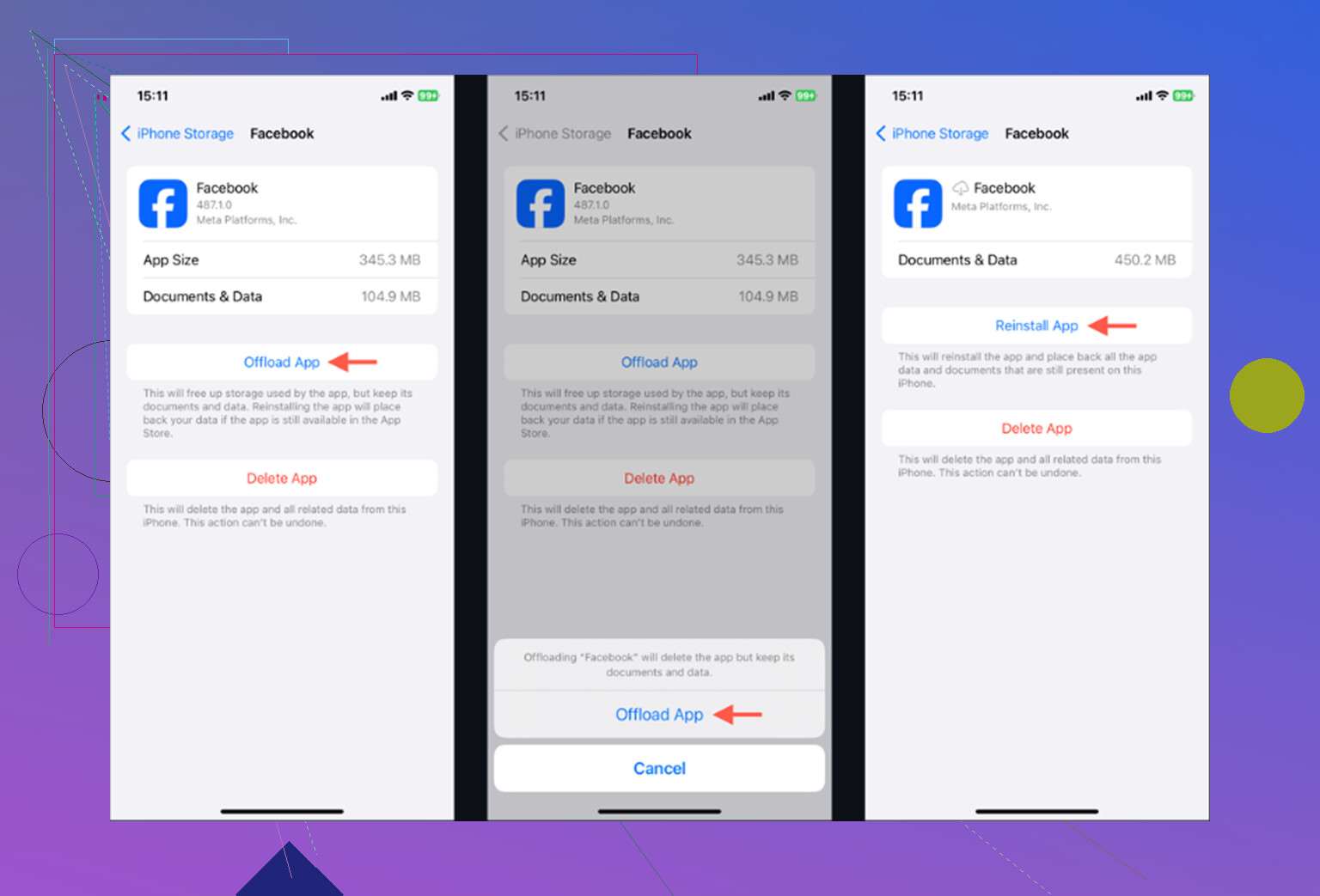
Don’t waste your time offloading Facebook if the goal is real space. @mikeappsreviewer already said it doesn’t do much, and that’s putting it kindly. Offload keeps the Documents & Data blob, which is usually the fat part. So you sit through the whole process, watch a couple hundred MB come back, and the bloat is still there. Full delete and reinstall or nothing.
On the Messenger question, everyone above is right that it’s a separate app with separate storage, so nuking Facebook leaves your chats alone. But there’s a step nobody mentioned that saves you from deleting Messenger at all. Open Messenger, go to your profile picture, then Storage (or Data usage depending on version), and you can clear cached media straight from inside the app. That dumps the downloaded photos and videos without touching your conversations or logging you out. So if Messenger is the bloated one, you don’t have to delete and re-login like you do with Facebook. Check that before you go reinstalling anything.
The thing to keep in mind, and @nachtdromer touched on it, is that chat history in Messenger lives on Facebook’s servers tied to your account. Clearing local cache just removes the copies your phone downloaded. Scroll back through an old thread after clearing and the images redownload. Same loop as Facebook. You’re not deleting anything permanent, you’re just resetting what’s stored locally.
Honestly though, if you’re back here in a week fighting the same warning, the app cache isn’t your problem. The photo cleanup point earlier is the real answer. Something like Clever Cleaner is fine for spotting the giant videos and near-duplicate shots fast, just don’t expect an app to fix the habit of never deleting anything. That part’s on you.