From what I’ve seen, Cyberduck looks clean but also kind of basic. Does the interface still feel modern when you use it, or does it feel like older software that just hasn’t changed much?
Cyberduck - My Review
Cyberduck is a free, open-source server and cloud storage browser used to manage files between a computer and various remote locations. It supports a wide range of protocols, including FTP, SFTP, WebDAV, and Amazon S3. Since its initial release, it has become a staple for web developers and IT professionals who need a versatile tool to bridge the gap between local storage and the cloud.
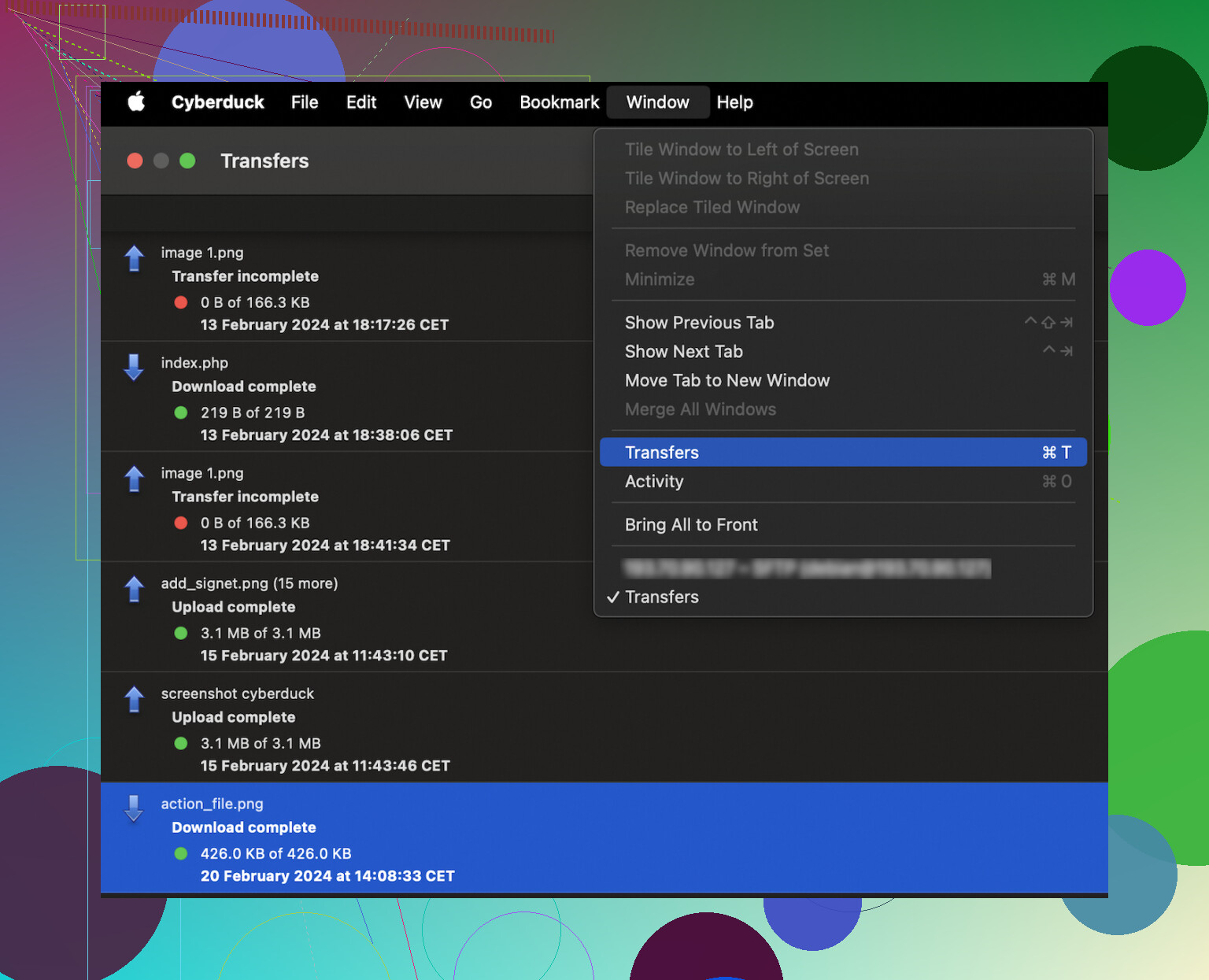
The software is available for both Windows and macOS. Unlike traditional transfer clients, its interface uses a single-pane layout that functions more like a native file browser, focusing on a clean and simplified user experience.
Strengths
Cyberduck maintains a loyal user base for several key reasons:
- Libre and open source, aligning with the “open web” philosophy and remaining free to use
- Broad protocol support, handling modern cloud services like Backblaze B2, Microsoft Azure, and OpenStack Swift
- Multi-segmented downloading, which improves transfer speeds by splitting large files into multiple parts
- Native system integration, including features like “Quick Look” for previewing files without downloading them
- Simplified cloud management, allowing users to browse cloud storage like a local drive without syncing all files
The software is particularly effective for users who work across different types of cloud storage and want a single, unified tool to access them all.
Weaknesses
Despite its versatility, Cyberduck has some performance and usability drawbacks. Users frequently report that the application can be prone to freezing or slowing down during heavy tasks, such as moving folders containing thousands of small files. This can make high-volume deployments feel sluggish.
Another common point of friction is the “nagware” behavior. Because the software is donation-based, it displays a popup reminder every time the app is closed, prompting users to contribute to the project. While it is a legitimate way to fund development, many find the frequency of these popups disruptive to their daily workflow.
Additionally, some users find the single-pane interface limiting. Because it lacks a side-by-side view of local and remote files, organizing complex directory structures can feel disjointed. There have also been reports of configuration issues with specific services like Backblaze B2, which can require manual troubleshooting to resolve.
Alternatives
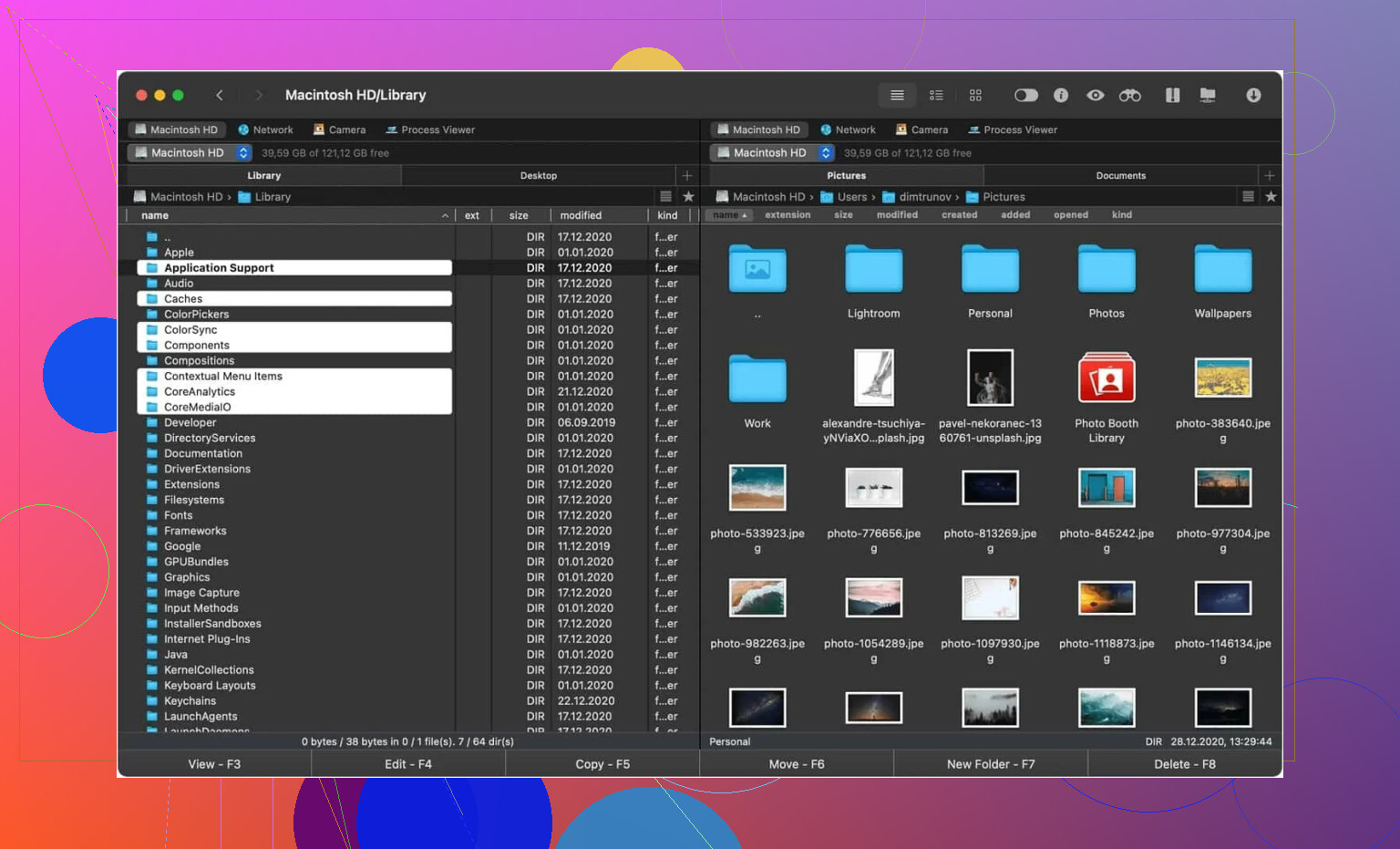
Commander One is often suggested as a more robust alternative, especially for power users on macOS. Commander One is a FTP client that offers more than the average service. Designed specifically for Mac users, Commander One is an effective file transfer solution that makes managing your files and folders as easy as possible.
The dual pane interface means that it’s easy to see where you’re moving your files to, addressing the visibility issues found in Cyberduck’s single-pane design. Another advantage is efficiency; configurable hotkeys let you customize your commands for quick access to whatever files and information you need. For those who find Cyberduck’s performance inconsistent, Commander One provides a more stable, high-speed environment for intensive file management.
How to Use Cyberduck
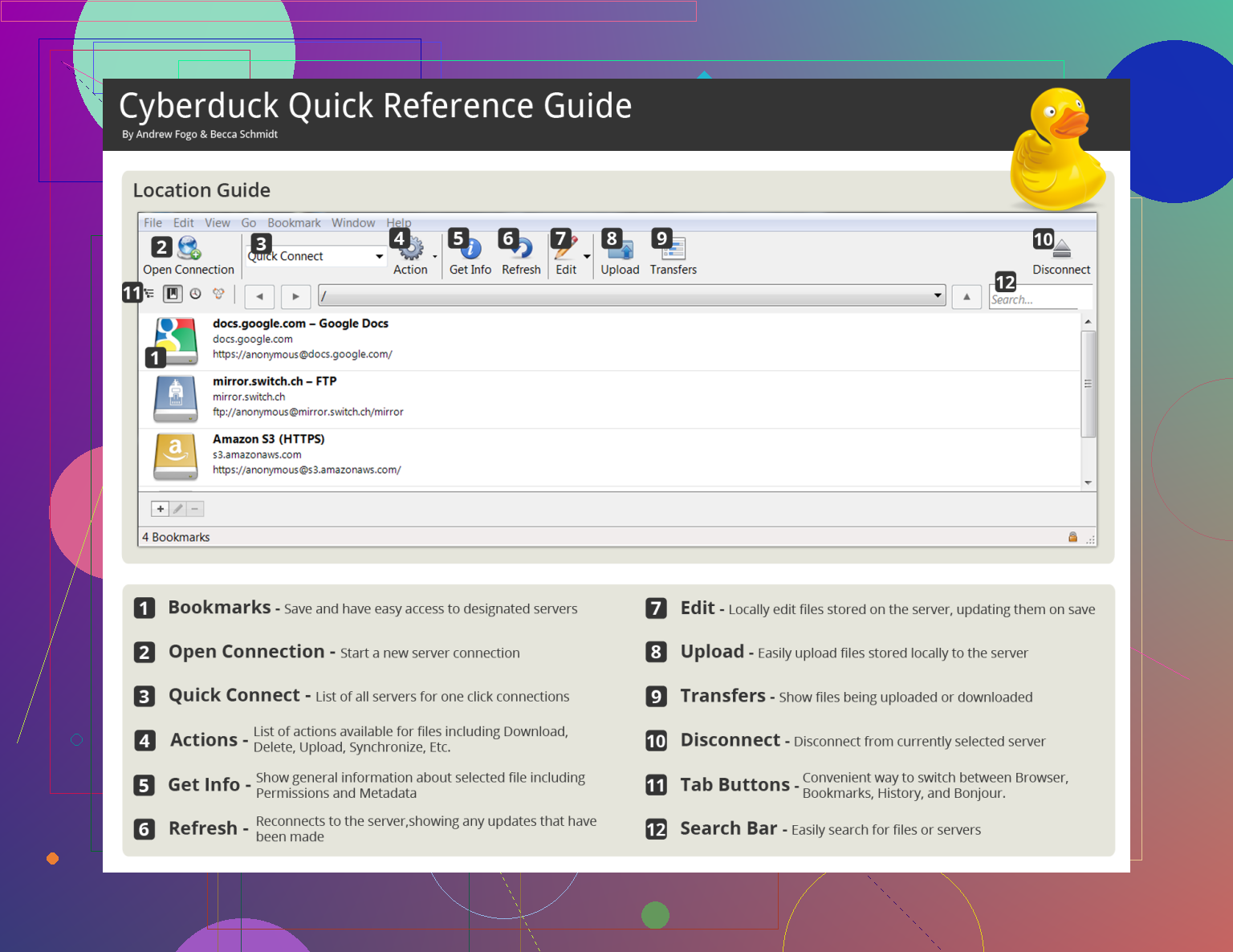
Getting started with the software is a straightforward process:
- Download and install Cyberduck from the official website.
- Click the Open Connection button at the top of the window.
- Select your protocol (e.g., SFTP or S3) from the dropdown menu and enter your server details.
- Once connected, drag and drop files from your desktop directly into the Cyberduck window to upload.
- To speed up large transfers, ensure that multi-segmented transfers are enabled in the settings.
To minimize the “nagware” popups, users often choose to make a small donation to receive a registration key, which removes the exit prompts for a smoother experience.
Final Verdict
Cyberduck remains a highly capable tool for basic file transfers and cloud storage browsing. Its open-source nature and wide-ranging protocol support make it a valuable asset for developers who need to access multiple types of servers without paying for a premium license.
However, the application’s tendency to lag during heavy operations and the persistent donation prompts may push power users toward more professional alternatives. Cyberduck is an excellent choice for casual or occasional use, but for those who require a high-performance, dual-pane workflow, a more specialized file manager may be the better investment.
16 Likes
Cyberduck feels old in workflow, not useless.
I disagree a bit with @mikeappsreviewer on the UI part. I do not think it looks bad. It looks clean. The issue is speed of work. Clean is not the same as fast. When you manage lots of folders, compare local vs remote, or move through deep paths all day, the single-pane design slows you down. You spend more time clicking and less time doing.
Where Cyberduck still holds up:
free, open source, broad protocol support, solid for SFTP and cloud buckets, decent for occasional admin work.
Where it starts to feel dated:
queue handling feels clunky, file comparison is weak, bulk operations feel less smooth than newer clients, and the overall flow is not built for heavy daily transfer work. Theres a difference between “works” and “works well for hours”.
If your use is light, keep it.
If your use is frequent, look at Commander One. Dual-pane file management saves time fast. For Mac users esp, it feels more current in day to day use.
So yeah, Cyberduck is still a solid option. It does feel a bit outdated now. Not broken, not dead, but a step behind.
Cyberduck feels “quietly old,” not ancient. That’s different.
I actually disagree a little with @mikeappsreviewer and @byteguru on the visual side. I don’t think the app looks that outdated. It’s more that the interaction model feels from another era. The UI is clean enough, but clean does not automatically mean efficient. If you’re just hopping into SFTP, grabbing a few logs, poking around an S3 bucket, Cyberduck is still perfectly fine. For that kind of occasional work, it’s honestly still one of the least annoying tools out there.
Where it starts to show its age is when your workflow gets repetitive or high-volume. The app feels more like a remote browser than a serious file workspace. That’s okay until you need to compare folders quickly, move batches around, or keep local and remote structures straight without mentally juggling everything. That single-window approach is simple, but not always practical. After a while it gets… kinda fiddly.
I’d also say Cyberduck is still strong if you care about:
- broad protocol and cloud support
- open-source software
- lightweight admin tasks
- quick access without setting up full sync
But if by “modern” you mean faster navigation, fewer clicks, better organization, and less friction for daily use, then yeah, it feels a bit behind now. Not unusable. Just less polished for power use.
That’s where Commander One makes more sense for a lot of people, esp on Mac. Dual-pane file management still wins in real life. It’s not flashy, it’s just faster when you’re doing actual work and not just browsing around.
So my take: Cyberduck is still solid, but modern-feeling? Not really. Functional, yes. Current? Eh, only if your needs are light.
I’m closer to @mike34 on this: Cyberduck feels old in interaction, not necessarily in appearance.
What makes it feel dated to me is not the visuals. It is the “browse, click, wait, repeat” rhythm. If you mostly open a server, upload a few files, maybe check a bucket, it still feels perfectly acceptable. In that role, it is actually pretty nice because it stays out of the way.
Where I disagree a bit with @byteguru and @mikeappsreviewer is on how severe the problem is. I do not think Cyberduck is broadly outdated. I think it is mismatched for heavy workflow. That is different. For light admin tasks, quick SFTP sessions, and cloud access without mounting or syncing everything, it still holds up well.
The real issue is scale:
- lots of nested folders
- repetitive transfers
- local vs remote checking
- bulk cleanup
- all-day use
That is where the single-pane model starts costing time. Not dramatic at first, but enough to get annoying.
If you want something that feels more work-oriented, Commander One is worth a look.
Pros of Commander One:
- dual-pane layout is faster for comparing and moving files
- better for repetitive file management
- feels more natural for drag, drop, sort, and organize work
- good fit for Mac users who live in file tools all day
Cons of Commander One:
- not everyone likes the classic file-manager style
- some advanced features sit behind paid tiers
- can feel like overkill if you just do occasional transfers
So: Cyberduck is still solid, just not especially modern in workflow terms. If your use is casual, keep it. If it is daily and volume-heavy, Commander One will probably feel less tiring.