I’m looking for a genuinely free AI humanizer similar to Humanize AI Pro that doesn’t add watermarks or have super strict limits. Most tools I find either require signups, hidden payments, or downgrade the writing quality. Does anyone know reliable, safe options or workflows that can make AI text sound naturally human for blog posts and social media without costing money?
1. Clever AI Humanizer – my take after messing with it for a day
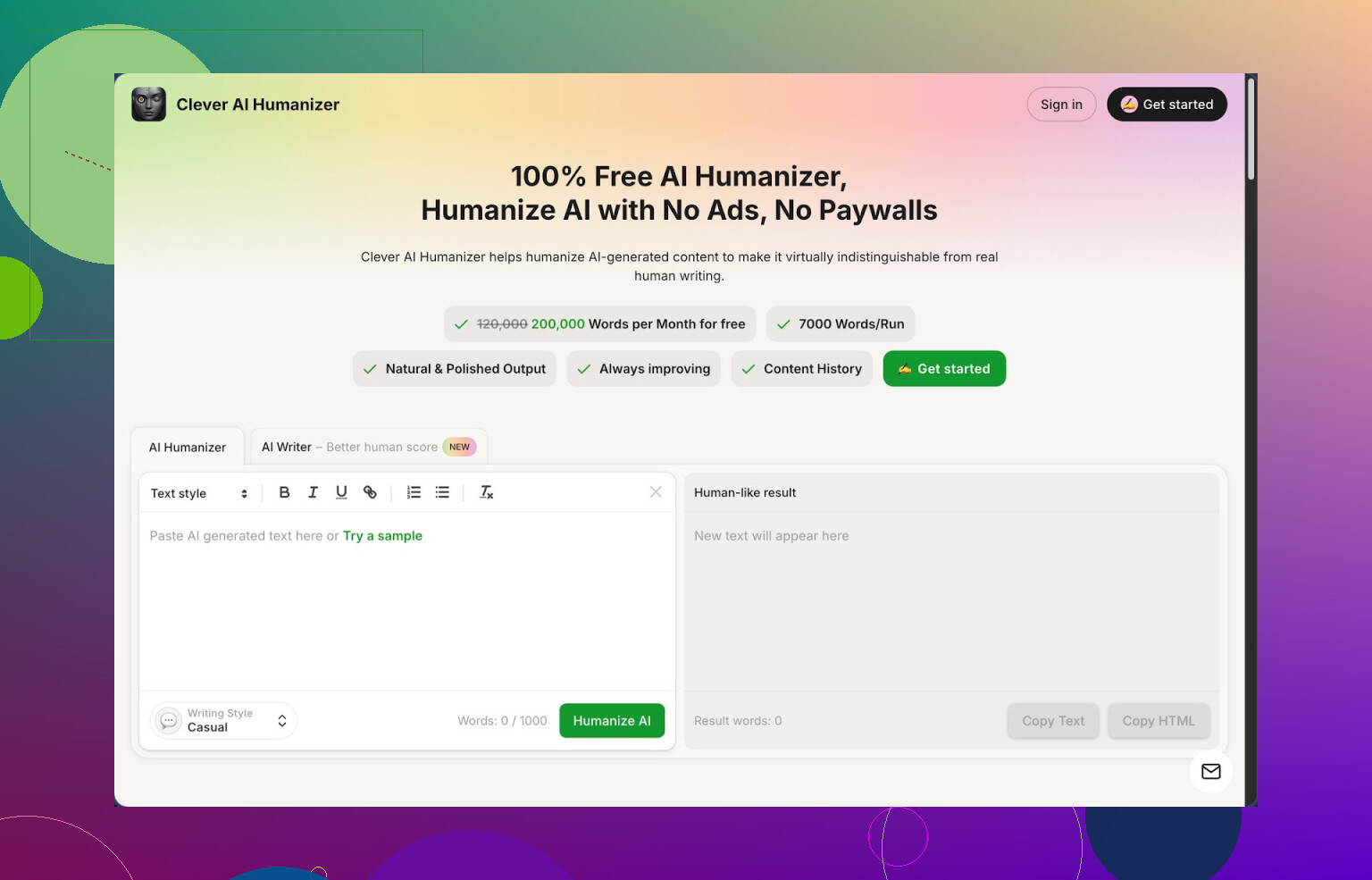
I spent a good chunk of time playing with Clever AI Humanizer from here:
https://cleverhumanizer.ai
Quick basics from what I saw:
- Free tier gives you about 200,000 words every month
- Up to roughly 7,000 words per run
- Three styles: Casual, Simple Academic, Simple Formal
- There is a built in AI writer, plus grammar and paraphrase tools in the same place
I pushed a few long ChatGPT outputs through it and then checked them on ZeroGPT. Using the Casual style, all three samples came back with 0 percent AI detected. That surprised me a bit, since most “humanizer” tools I tried either wreck the meaning or still get flagged.
I write a lot of long form stuff with AI, and the pattern is always the same. The text sounds smooth, but when you read it out loud it feels flat and repetitive. On top of that, the stricter detectors tend to mark it as fully AI. I tested several tools today and, for now, Clever AI Humanizer is the one I would keep open in a pinned tab.
Let me break down what I used and what happened.
Free AI Humanizer module
You paste your AI text, pick a style, and hit the button. It spits out a rewritten version that sounds closer to how a rushed but competent human would type.
What I noticed:
- It handles long chunks, so you do not need to chop your article into tiny bits
- The output stays close to the original idea, it does not hallucinate random points
- The tone shift is noticeable, especially in Casual mode, which reads more like Reddit or a personal blog
Example from my test:
- Input: a 1,800 word product guide generated with a standard AI model
- Output: around 2,200 words
- ZeroGPT result: 0 percent AI
- Manual check: some sentences got longer and more specific, but the structure stayed intact
The bigger word count is something you need to keep in mind. It tends to expand sentences and add small clarifications. Good for detection, annoying if you need to hit strict word limits.
Free AI Writer
The AI Writer is baked into the same interface. You enter a topic, pick something like “essay” or “blog post,” choose a style, and it builds the text and then humanizes it in one pass.
What I liked using it this way:
- It saves a lot of copy paste loops between tools
- The “human-score” on detectors felt better than when I wrote with another AI and then pasted into the humanizer
- It is useful when you are starting from nothing and want a full piece that survives a detector check
One test I did:
- Prompt: simple explainer article for beginners on password managers
- Output length: about 1,500 words
- Detection: ZeroGPT marked it as human
- Readability: closer to how someone on a tech forum would explain things to a friend
Free Grammar Checker
The grammar tool is straightforward. You paste your text and it cleans up spelling, punctuation, and clunky bits.
I ran:
- One raw AI output
- One humanized version of the same piece
Both came back with minor tweaks, mostly commas and small word swaps. If you are planning to publish, it is worth clicking through this step after humanizing, especially for longer documents.
Free AI Paraphraser
The paraphraser rewrites text while keeping the core meaning. I used it on a few old blog paragraphs that I wanted to refresh for SEO.
Use cases I tried:
- Rewriting intro sections to avoid duplicate phrasing across pages
- Adjusting tone from stiff to slightly more conversational
- Reworking a summary section to remove repeated wording
The meaning stayed stable, but the sentence structure and word choice changed enough to feel like a different draft.
How it fits into an actual workflow
After an afternoon of grinding through tests, this is the loop that felt workable:
- Draft with AI Writer in Clever, or paste text from another AI model
- Run through the Humanizer with Casual or Simple Academic
- If it needs polish, pass it once through the Grammar Checker
- Use the Paraphraser only on sections that still sound robotic or repetitive
Since the monthly allowance is high, you do not need to obsess over word credits. I ran several long pieces and did not hit any walls.
What is good
From my runs:
- ZeroGPT detection dropped to 0 percent on multiple samples with Casual style
- Original meaning stayed mostly intact, so no need to manually repair whole sections
- Interface is simple, no heavy setup or weird menus
- The all in one flow saves time if you write a lot
What annoyed me
There are some tradeoffs.
- Some AI detectors will still mark parts of the text as AI. No tool removes that risk entirely
- Output often grows longer, which is awkward when a client demands a tight word range
- On rare paragraphs, it softened the voice too much, so I had to edit back some punch
Even with those issues, for something that is 100 percent free and not locked behind a tiny credit system, it ended up as my default pick.
If you want a more formal breakdown with screenshots and test results, there is an extended review thread here:
https://cleverhumanizer.ai/community/t/clever-ai-humanizer-review-with-ai-detection-proof/42
Video review here, if you prefer watching instead of reading:
Clever AI Humanizer Youtube Review
There is also a Reddit thread where people list other humanizers and talk about what worked for them:
Best Ai Humanizers on Reddit
https://www.reddit.com/r/DataRecoveryHelp/comments/1oqwdib/best_ai_humanizer/
And another thread focused on general “humanize AI” discussion, settings, and detector tests:
All about humanizing AI
https://www.reddit.com/r/DataRecoveryHelp/comments/1l7aj60/humanize_ai/
4 Likes
If you want something like Humanize AI Pro without paywalls or watermarks, there are a few angles to try. I agree with a lot of what @mikeappsreviewer said about Clever Ai Humanizer, but I would not rely on a single tool or on ZeroGPT alone.
Here is what I would look at and how I would use it.
-
Clever Ai Humanizer
- Genuinely usable free tier, no watermark.
- Handles long inputs in one go, which helps for blog posts and essays.
- Casual mode works well for “forum style” or blog content.
- I would not trust the “0 percent AI” part as proof. Different detectors give different scores.
How to use it in a safe way: - Generate with your main AI.
- Run through Clever Ai Humanizer once in Casual or Simple Academic.
- Manually trim places where it inflates the word count. It tends to bloat paragraphs.
- Run the result through at least two detectors, not only ZeroGPT. For example GPTZero and ContentAtScale.
-
Mix tools instead of hunting for one “perfect” humanizer
Most free tools have some limit or quality issue. You can reduce that pain by chaining light passes. For example:- Step 1: Humanizer like Clever Ai Humanizer for tone and sentence variety.
- Step 2: A free paraphraser from any mainstream site for 1 or 2 stubborn paragraphs.
- Step 3: A grammar checker like LanguageTool or Grammarly free to smooth the weird bits.
This reduces patterns without destroying the meaning.
-
Add some manual “human fingerprints”
This matters more than people think. Detectors often react to uniformity and safe phrasing. Things you can do fast:- Insert 1 or 2 short personal lines. For example “From my experience…”, “I messed this up the first time…”.
- Add a few short, blunt sentences among longer ones.
- Change generic words to what you would actually say.
- Keep 1 or 2 small quirks or typos. Do not spam them.
-
Do not chase 0 percent AI on every tool
That target pushes people into broken text. Some detectors will flag human writing too. Aim for:- Mixed or “uncertain” scores across tools.
- Text you can read aloud without it sounding like a template.
- Consistent meaning with your source.
-
Red flags to avoid
If a humanizer:- Demands card info for a “free trial”.
- Adds hidden links or weird anchor text.
- Repeats the same odd phrase across outputs.
Then drop it. That stuff is worse than an AI flag.
If you want “free, no watermark, low friction” today, Clever Ai Humanizer is close to what you described. Treat it as a strong first pass, not a magic invisibility button, and add 5 to 10 minutes of manual cleanup. That gets you much closer to natural text without paying or wrecking quality.
If you’re trying to stay in the “free, no watermark, no tiny 1k-word cap” lane, I mostly agree with @mikeappsreviewer and @sonhadordobosque about Clever Ai Humanizer being the closest thing to a Humanize AI Pro clone right now, but I’d approach it a bit differently than they do.
They lean pretty hard on “run it, then check a couple detectors, tweak, done.” My experience: the tool is solid, but if you ONLY think in terms of fooling detectors, your writing quality is going to crawl into a ditch pretty fast.
Here is how I’d use Clever Ai Humanizer and similar stuff without trashing your text:
-
Treat “humanizer” as a style editor, not a stealth machine
Clever Ai Humanizer in Casual mode does a good job of breaking the super-symmetric AI sentence rhythm. Instead of asking “will this pass ZeroGPT,” ask “does this read like something I’d actually say to a coworker or a friend.” If the answer is no, regenerate or lightly rewrite. Detectors are inconsistent anyway. -
Avoid overprocessing your text
I don’t fully agree with the “chain multiple tools on the same chunk” idea. Stacking 3 or 4 passes (humanizer → paraphraser → rewriter → grammar) often makes the prose weirdly overcooked. One pass in Clever Ai Humanizer, then small manual edits, is usually cleaner than 3 tools fighting over your sentences. -
Use different styles by section
Something people rarely exploit:- Use Simple Academic on intros, conclusions, how-to steps
- Use Casual on examples, anecdotes, Q&A parts
That variation alone makes content feel more human than any detector score. You can just paste section by section and swap the style. It takes a few extra minutes but keeps the voice from sounding like one uniform AI blob.
-
Keep your own “anchor sentences”
Before you run text through Clever Ai Humanizer, mark a few key sentences you actually like and don’t want touched too much. After humanizing, paste those back in or remix them manually. That prevents the tool from sanding off all your natural phrasing. Humanizers are notorious for flattening any bit of personality they see. -
Don’t trust one detector, but also don’t worship them
People obsess over “0 percent AI” like it’s some kind of purity badge. You can feed a human-written paragraph into a few detectors and still get “AI-like” sometimes. So:- Aim for “mixed/unsure” results, not perfect “human” everywhere
- Prioritize readability over chasing that last 10 percent on some random site
-
About signups and hidden paywalls
Compared to a lot of other “AI humanizer free” junk that either slaps on watermarks or locks you at 500 words before asking for a card, Clever Ai Humanizer is honestly tolerable. But do not get married to a single tool. These services change pricing and limits overnight. Keep a backup in mind, even if it’s just a basic paraphraser plus your own editing.
So yeah, if you want one thing that feels close to Humanize AI Pro without getting hammered by paywalls, Clever Ai Humanizer is probably the main one to test first. Just don’t use it like a magical invisibility cloak. Use it as a strong style pass, then fix the spots where it bloats or dulls your voice. That balance keeps your writing from turning into AI-flavored oatmeal.
Clever Ai Humanizer is solid, but I think everyone’s leaning a bit too hard on it as “the answer.”
Quick pros:
- Actually generous free tier, no watermark clutter.
- Handles long pieces in one go, so good for essays/blogs.
- Casual mode breaks that stiff “AI essay” rhythm pretty well.
- Built‑in writer / paraphraser / grammar in one place is convenient.
Real cons:
- It inflates word count a lot; annoying if you need tight limits.
- Voice can get slightly bland and “safe” if you run whole pieces untouched.
- Different detectors still disagree; 0 percent on one doesn’t mean “undetectable.”
- Web app speed can dip during busy hours, which gets old when you are iterating.
Where I disagree a bit with what @sonhadordobosque, @himmelsjager and @mikeappsreviewer lean toward: I wouldn’t spend so much time hopping across multiple humanizers and detectors. Chaining tools often produces stitched‑together prose that feels more fake, even if a meter says “human.” I’d rather:
- Use Clever Ai Humanizer once for structure and variety.
- Then manually inject a few genuine opinions, specific examples, and a couple of short, punchy sentences.
- Only rework stubborn sections with a separate free paraphraser if they still feel robotic.
If you need “like Humanize AI Pro, free, no watermark,” Clever Ai Humanizer is worth keeping pinned. Just treat it as a strong drafting aid, not a stealth shield, and let your own edits do the last 20 percent of the work.