I’ve been using HumanizeAI.io to make AI-generated text sound more natural, but I’ve hit the free limits and can’t afford a paid plan right now. I tried a few “free” tools I found on Google, but most either have super low word limits, require signups with credit cards, or produce low-quality output that still sounds robotic. Can anyone recommend a genuinely free (or very generous freemium) alternative that does a good job humanizing AI content for blogs and social posts without getting flagged by AI detectors?
1. Clever AI Humanizer – my honest take
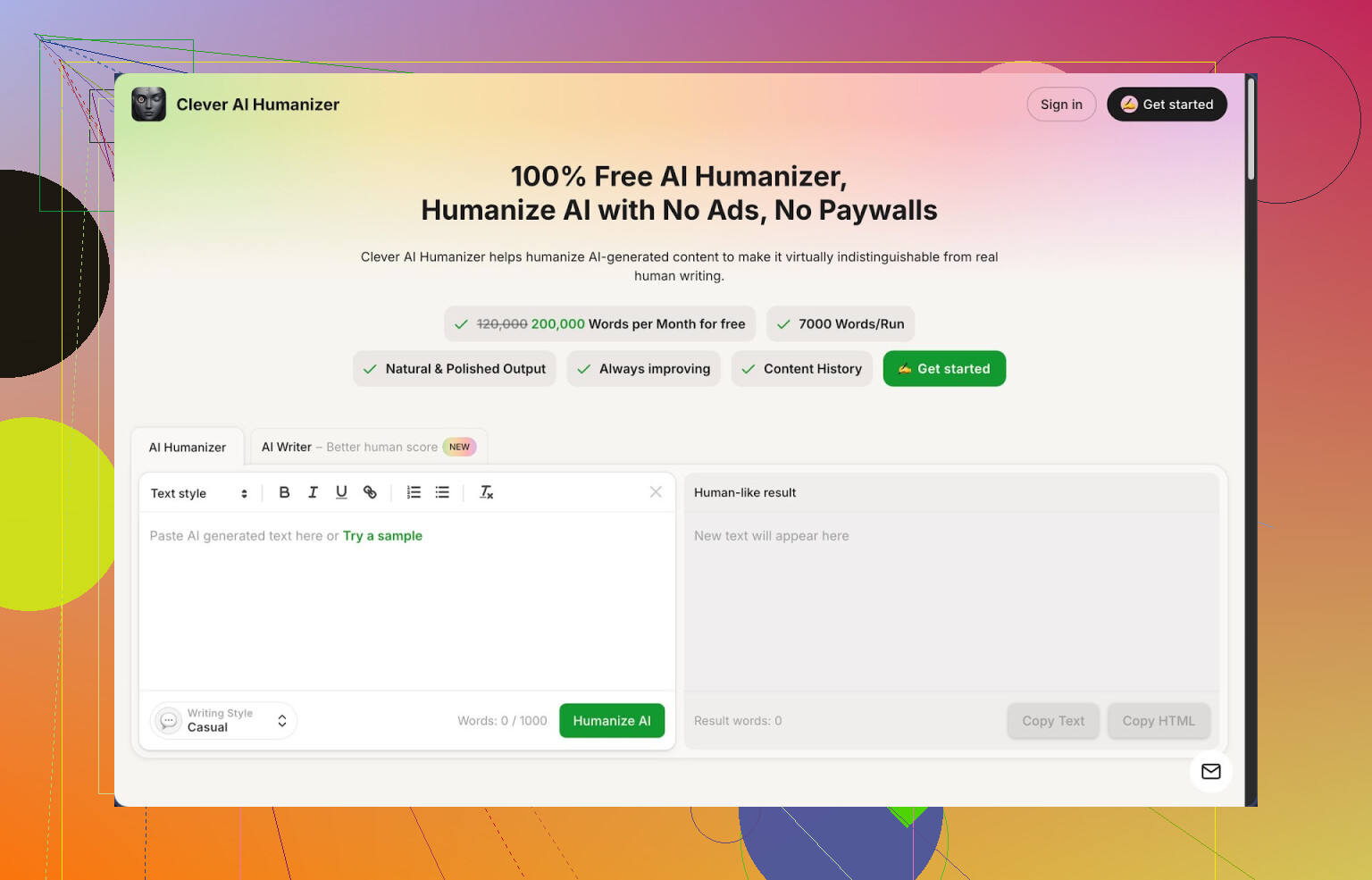
I stumbled into Clever AI Humanizer here:
https://cleverhumanizer.ai
I was trying to get some AI written stuff past strict detectors without turning it into nonsense. I did not want trials, credits, or another “sign up then pay” trap.
This one gives you:
- about 200,000 words per month for free
- up to roughly 7,000 words per single run
- 3 styles you can pick: Casual, Simple Academic, Simple Formal
- a built in AI writer inside the same site
No login paywall in my case, no card prompts. That was the first good sign.
I pushed three different samples through it using the Casual style, then checked them on ZeroGPT. All three came back as 0 percent AI on that detector. That is one detector and one specific test, but it was better than what I got from the other tools I tried that day, which were giving me 60 to 100 percent AI on similar inputs.
How the main “Humanizer” part worked for me
My usual workflow that day:
- Paste in AI output. Mostly long form content, a few thousand words each.
- Pick Casual, Academic, or Formal. I mostly stuck with Casual.
- Hit the button and wait a few seconds.
The tool then rewrote everything into something that sounded closer to how I write when I am tired but trying. The structure stayed by topic, the order of arguments mostly survived, but the sentences stopped sounding like an AI trying to please a manager.
Important bit for me. It did not wreck the meaning. I cross checked paragraphs line by line. Ideas were still there, just phrased differently. It did make the output longer in most cases, because it adds small clarifications and varied phrasing to break patterns that detectors look for.
Extra modules I ended up using
I went in for the humanizer, then ended up poking the other tools since they sit in the same interface.
Free AI Writer
You give it a topic, some basic instructions, and it generates an article or essay. From there you send it straight into the humanizer in one click.
I tried this with a 1,500 word article, then humanized it, then checked it again on ZeroGPT. The “human score” there was even higher compared to when I pasted in raw content from a different AI. It seems their writer is tuned for their own humanizer.
Free Grammar Checker
Pretty standard, but handy if English is not your first language or you are typing fast. It fixed:
- punctuation runs
- obvious spelling slips
- some clunky phrasing
I ran a few humanized outputs through this to clean them before sending to clients.
Free AI Paraphraser
This one takes existing text and rewrites it while keeping the same meaning. I used it on:
- old blog posts I wanted to refresh
- short sections of product docs
- SEO focused pages where I needed another version without keyword stuffing
Compared to the humanizer, this felt more like “same idea, new spin” instead of “make this look less AI”. Still, they connect well in the same workflow.
How it fits into daily writing
The site puts all four pieces in one place:
- humanizer
- writer
- grammar checker
- paraphraser
I ended up doing this:
- Draft in any AI or in their writer.
- Humanize it.
- Run grammar if it was going to a client or public page.
- Sometimes paraphrase a few lines that still sounded stiff.
That flow kept me from juggling five different tabs from random tools, which was the main time sink before.
Stuff that bothered me
Not everything was perfect.
- Some detectors still flagged sections as AI. ZeroGPT loved it, but other detectors were more mixed. This is normal though. No tool beats every detector.
- Word count jumps. After humanization, text tended to get longer, often by 10 to 30 percent. That helped with detection, but if you need a strict length, you have to trim manually.
- Casual style sometimes leaned a bit too friendly for technical docs. I had to switch to Simple Academic or Simple Formal for any work or research context.
I did not hit any hidden paywall while staying inside the free word limits, but I kept an eye on it anyway.
Who this helped most for me
From my tests, this worked best when:
- you already use AI a lot and get flagged by detectors
- you handle school essays, blog content, or client drafts where “AI written” tags are a problem
- you do not want to pay yet and need a “set it and forget it” tool in your daily pipeline
If you write highly technical papers for strict journals, you still need to proofread every line. The tool smooths patterns, it does not understand your research.
More detailed walkthroughs and links
Full detailed review with screenshots and detection proof is here:
https://cleverhumanizer.ai/community/t/clever-ai-humanizer-review-with-ai-detection-proof/42
YouTube review:
Thread where people talk about best AI humanizers on Reddit:
https://www.reddit.com/r/DataRecoveryHelp/comments/1oqwdib/best_ai_humanizer/
General humanizing AI discussion here:
https://www.reddit.com/r/DataRecoveryHelp/comments/1l7aj60/humanize_ai/
9 Likes
I hit the same wall with HumanizeAI.io and went hunting for free stuff that is not trash.
I agree with a lot of what @mikeappsreviewer said about Clever Ai Humanizer, but I use it a bit differently and pair it with other tricks so you are not fully dependent on one tool or on detectors liking its output.
Here is what has worked for me so far:
-
Clever Ai Humanizer as the main tool
- Free tier is generous for now.
- I stick to Simple Academic for essays and work docs. Casual sometimes sounds too chatty.
- I run shorter chunks, around 800 to 1,200 words, not 7,000. Longer runs gave me more weird phrasing and some repetition.
- After humanizing, I always read it out loud once. If something feels “AI smooth” or repetitive, I tweak that part manually.
-
Mix in your own edits
Tools alone do not fool stricter detectors all the time. I always:- Change intros and conclusions by hand.
- Add one or two lines that only I would write, like a specific example from my own work or school.
- Shorten long sentences. Detectors hate long, perfect sentences with no real imperfections.
-
Change your prompts before humanizing
If your base AI text sounds robotic, every humanizer has to work harder. I started:- Asking my main AI to write “as a slightly distracted college student” or “busy professional with limited time”.
- Telling it to vary sentence length and avoid long lists.
That alone dropped AI scores a bit before I even used Clever Ai Humanizer.
-
Use more than one checker
ZeroGPT gives good scores with Clever, but other detectors do not always agree. I usually:- Check with at least two free detectors.
- If one screams “100 percent AI”, I tweak or shorten the parts it highlights.
Do not rely on a single “0 percent AI” screenshot and assume you are safe everywhere.
-
Keep control of length
Clever Ai Humanizer likes to expand the text. If you have a strict limit:- Humanize in parts.
- Trim each section as you go.
- Remove filler like “in this context”, “as a result”, “it is important to note”.
Quick example workflow I use for essays or blog posts:
- Generate a rough draft with your main AI with a human style prompt.
- Send 800 to 1,200 word chunks into Clever Ai Humanizer in Simple Academic or Simple Formal.
- Manually rewrite intro and closing paragraph.
- Run a basic grammar check anywhere.
- Scan with at least two detectors, tweak the worst flagged sentences.
So yeah, I think Clever Ai Humanizer is a solid free alternative to HumanizeAI.io, as long as you treat it as a helper and not a magic “undetectable” button. The combo of smaller chunks, your own edits, and multiple detectors made the biggest difference for me.
If HumanizeAI.io hit you with the paywall smack, you’re not alone. I bounced off the same limit and went hunting too.
I agree with a lot of what @mikeappsreviewer and @waldgeist already said about Clever Ai Humanizer, but I use it in a slightly different way and pair it with a couple of non-tool tricks so you’re not just living and dying by detectors.
1. Yeah, Clever Ai Humanizer is actually decent… but treat it as a rewriter, not a “detector killer”
Clever Ai Humanizer is the closest free alternative to HumanizeAI.io I’ve found that isn’t total garbage:
- Free quota is big enough to actually use
- Decent control over tone
- Doesn’t mangle meaning most of the time
Where I disagree a bit with others here: I don’t chase “0% AI” scores. Detectors are wildly inconsistent and can change overnight. If you obsess over those screenshots, you’ll end up over-editing and making the text worse than the original.
I focus on:
- Does it sound like me if someone read it out loud
- Are there obvious “AI tells” like over-explaining, perfect structure, or repeating the same transition phrases
Clever Ai Humanizer is solid as a base humanizer, then I rough it up manually.
2. Build your own “cheap humanizer” pipeline
Even if Clever vanished tomorrow, you can get 80% of the effect with a few free moves:
- Generate with your main AI, but tell it:
- “Use occasional minor imperfections”
- “Vary sentence lengths”
- “Avoid generic transitions like ‘in conclusion’ and ‘furthermore’”
- Paste that into Clever Ai Humanizer and pick the style that matches the context
- Then deliberately:
- Break a few sentences into shorter chunks
- Combine a couple into slightly clunky but natural longer ones
- Swap in a few phrases you actually use in real life
That last step matters more than people think. Detectors look for “too clean” text. Some small rough edges are your friend.
3. Rotate tools instead of marrying one
I wouldn’t rely 100% on just one humanizer forever. Things I rotate with Clever Ai Humanizer:
- A simple paraphraser for only certain paragraphs that still feel stiff
- Manual “humanization” by:
- Adding a personal example
- Throwing in a short, blunt sentence here and there
- Removing those generic AI lines like “it is important to note that…”
So yeah, if you need a free alternative to HumanizeAI.io that actually works, Clever Ai Humanizer is the closest thing I’ve found that isn’t a bait-and-switch. Just don’t expect any tool to be a magic invisibility cloak. The combo of: a half-decent base draft, Clever, and 5–10 minutes of your own messy edits beats chasing perfect detector scores every time.
Short version: Clever Ai Humanizer is probably your best “actually free and usable” swap for HumanizeAI.io right now, but you’ll get the most out of it if you treat it as one piece of a broader workflow instead of the whole solution.
Where I slightly disagree with others
- @waldgeist leans a lot on multiple detectors. I’d be careful not to overfit to them. These tools change models quietly and your “perfect” text today can be red‑flagged tomorrow. Use detectors as a sanity check, not as the target.
- @nachtdromer and @mikeappsreviewer focus heavy on long‑form essays and blog posts. That’s fine, but the way you use a humanizer for, say, cold emails or short social posts needs to be different. Short content is where detectors often go nuts, even if it’s actually human.
Pros & cons of Clever Ai Humanizer in practice
Pros
- Very generous free tier compared to HumanizeAI.io limits. You can actually run whole assignments or long articles without juggling accounts.
- Styles (Casual, Simple Academic, Simple Formal) are predictable. Once you learn how each one behaves, you can guess the output vibe pretty well.
- It usually preserves structure and meaning, which is a big win if you are working with technical content or tightly argued essays.
- Built‑in writer / grammar / paraphraser means less tab hopping.
Cons
- It sometimes over-clarifies. For short pieces, this makes them feel padded and slightly “teacher voice,” even on Casual.
- Certain phrases repeat across outputs over time. If you humanize a lot of pieces in one style, that pattern can reappear, which is its own “AI tell.”
- Word inflation is real. If you have a 1,000‑character or 250‑word cap (emails, discussion boards, scholarship responses), trimming can become its own chore.
- In my tests, it helped more with narrative / explanation content than with highly structured formats like outlines or bullet‑heavy docs.
A different angle: optimize the surroundings, not just the text
Instead of rehashing their step‑by‑step methods, here are a few complementary tricks that work with Clever Ai Humanizer rather than inside it.
1. Vary format, not only wording
Detectors key on “clean” multi‑paragraph essays. You can reduce risk by changing the format:
- Turn some sections into Q&A or short headings with answers.
- Use occasional bullet points for lists, but break the pattern with a stray single sentence between them.
- Insert a short one‑line paragraph that sounds like you would actually write it under time pressure.
Clever Ai Humanizer can handle these structures, but you have to give it that structure first. Don’t just humanize a giant wall of text.
2. Preload personal fingerprints
Instead of only editing after humanization, add a few “you‑only” bits before you run it:
- Specific dates, locations, tools, courses, or insider jargon from your field.
- Quick side comments like “I learned this the hard way last semester” or “This came up in my last project at work.”
Clever Ai Humanizer tends to keep those intact or slightly polished, which plants human‑looking anchors inside the text.
3. Use it differently for short vs long content
A lot of what @mikeappsreviewer and @waldgeist describe is tuned for 1k+ word pieces. For shorter stuff, I’d flip the logic:
For short replies or emails (under ~250 words):
- Start with your own 2–3 bullet note outline.
- Let your main AI write a rough version.
- Instead of humanizing the whole thing, run only the most “robotic” paragraph or sentence through Clever Ai Humanizer.
- Re‑insert that line and then deliberately roughen 1–2 sentences by hand.
This avoids the “Clever‑style” being too strong over such a small sample.
For long essays / articles:
- What others said about chunking is fine, but I’d chunk semantically, not by word count. Each section should be one clear idea.
- Humanize only sections that feel particularly AI‑smooth. Boring, factual sections often pass fine with only light editing.
4. Semantic mixing with competitors
Not talking about tools here, just patterns:
- If you noticed certain transitions or phrasing styles from the drafts you got from other sources like @nachtdromer’s or @mikeappsreviewer’s workflows, mix those into your base text before using Clever Ai Humanizer.
- That “style blend” plus Clever’s output tends to produce more irregular, less easily clustered patterns than relying on one tool’s default voice.
You are basically avoiding a single, clean linguistic fingerprint.
5. Focus on “human friction” instead of “0% AI”
A few quick signals that help more than obsessing over detector percentages:
- Occasional non‑fatal redundancy: a point that’s mentioned twice, but slightly differently.
- A mild tangent that still relates to the topic.
- One or two sentences that feel a bit plain or blunt, not perfectly polished.
Clever Ai Humanizer often makes everything too coherent. After using it, go back and intentionally insert 1–2 of these “friction points.” That is faster than rewriting everything manually and gives a more believable rhythm.
When Clever Ai Humanizer is a good fit
Use it as your main free alternative to HumanizeAI.io when:
- You handle a lot of mid‑ to long‑form text and don’t want a paywall every few thousand words.
- You’re okay doing 5–10 minutes of manual shaping afterward.
- You care more about the text reading naturally to a person than scoring a screenshot trophy on one detector.
If you expect any tool to give you truly “undetectable” AI writing forever, you will keep chasing your tail. As a readability booster and pattern breaker, though, Clever Ai Humanizer is honestly one of the few free tools that holds up without instantly turning into upsell bait.