I’m working on blog posts and social content, and every paraphrasing tool I try makes the text sound robotic or clearly AI written. I need something free (or at least with a decent free tier) that keeps a natural, human tone and doesn’t mess up the meaning. What tools or workflows are you using that actually sound real and won’t hurt SEO or readability
QuillBot used to cover what I needed. Then one day I logged in and most of the useful tones and styles were sitting behind a paywall. I tried to work around it for a bit, but it slowed me down more than it helped.
So I went hunting for alternatives.
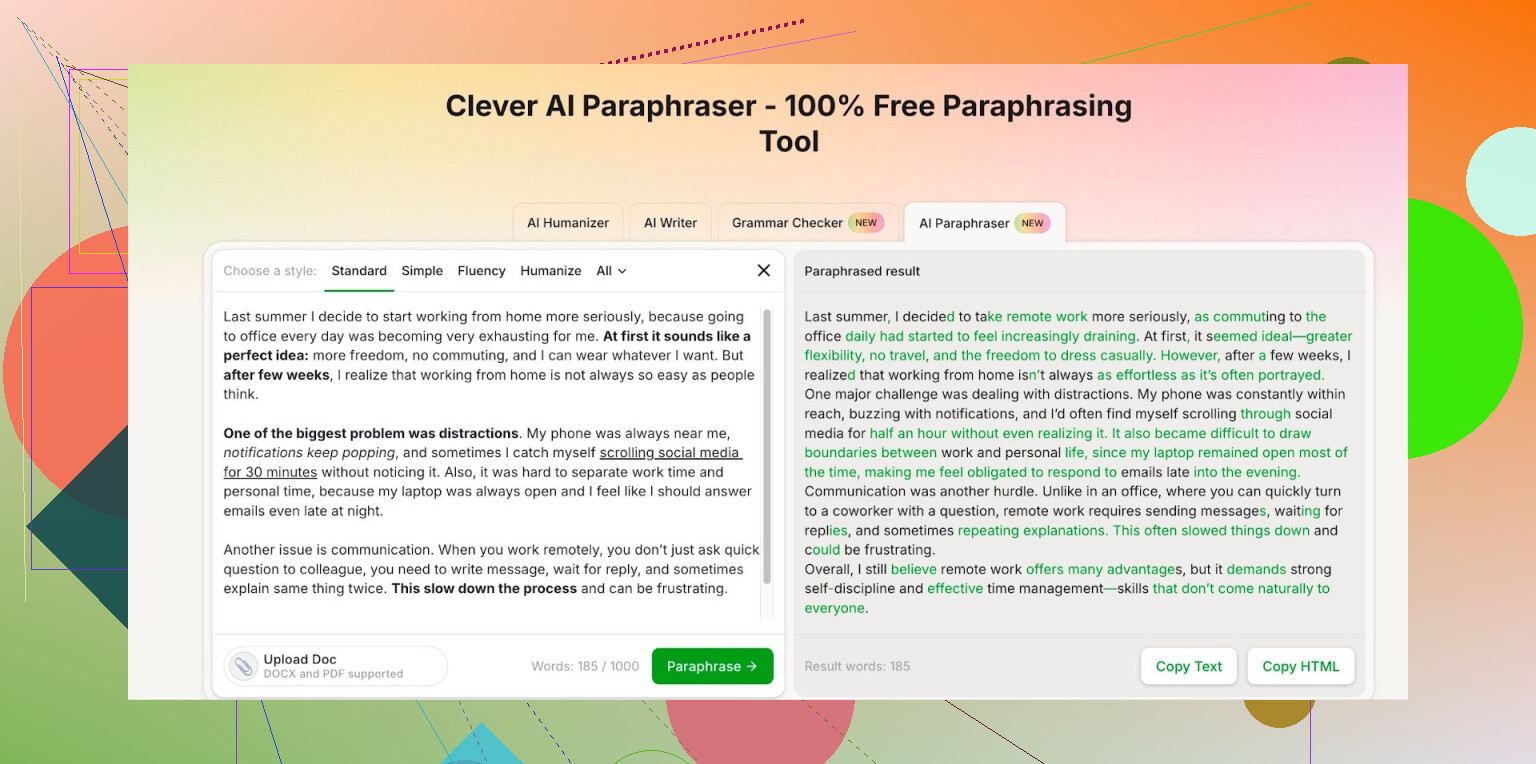
I ended up on Clever AI Humanizer and stuck with this Free AI Paraphraser from there:
Here is what I noticed using it for my own stuff:
- The style options feel closer to what QuillBot had before the paywall. I swap between more formal text for reports and lighter text for emails, and it handled both in a way that did not scream “AI wrote this”.
- After logging in, the free quota shows 7,000 words per day and 200,000 per month for paraphrasing. I track my writing volume pretty tightly, and I have not hit the cap yet doing work docs, blog drafts, and some study notes.
- Output needs light editing, like any tool. I usually run a paragraph, then fix phrasing to sound like me. It still saves a lot of time compared to rephrasing from scratch.
If you are trying to avoid paying yet another subscription for paraphrasing, that link above is the one I have been using.
23 Likes
I agree with @mikeappsreviewer on one thing. Most tools went paywall-heavy and started sounding the same. I use Clever Ai Humanizer too, but I treat it as step two, not the whole workflow.
Here is what keeps my blogs and social posts from screaming AI:
-
Start with your own rough text
Do a quick brain dump in your own voice. Even if it is messy. Paraphrasers keep tone better when you feed them something that already sounds human. -
Use 1–2 short paragraphs at a time
Long inputs tend to get over-smoothed and robotic. I stick to 60–120 words per run. Shorter chunks keep structure closer to what I wrote. -
Mix tools instead of relying on one
- For rewrites with a natural feel, Clever Ai Humanizer works well if you choose a light setting and avoid “formal” unless you need it for reports.
- For micro edits, Grammarly’s free version helps fix grammar without rewriting your voice. I run the Clever output through Grammarly, then roll back any suggestions that change tone too much.
-
Force your voice back in
After paraphrasing, I always:- Add my go to phrases.
- Insert 1–2 short sentences that sound like I talk.
- Add small imperfections on purpose. A “kinda”, “idk”, or a short fragment sentence. Not overdoing it, or it looks fake.
-
Change structure, not only words
AI tools often swap synonyms and keep the same rhythm. To avoid AI vibes, I sometimes:- Cut one sentence into two.
- Merge two short ones into one longer.
- Move the key point to the start or end of the paragraph.
-
Use it more for ideation on socials
For social posts, I rarely paraphrase the whole thing. I:- Paraphrase 1–2 lines for hooks.
- Keep the rest manual.
That keeps the post from feeling “template”.
-
Quick “AI smell” check
Before posting, I scan for:- Overuse of words like “utilize”, “moreover”, “thus”.
- Too balanced structure. Every sentence same length.
- Overly safe tone. No opinion, no edge.
If I see that, I add one spicy line or a blunt take.
So yes, Clever Ai Humanizer helps, but your input and editing habits matter more than the tool. If you treat any paraphraser as a first draft helper and not the final voice, your stuff feels much more human.
I’m gonna be the slightly grumpy voice here and say: no paraphrasing tool, free or paid, is going to “magically” not sound AI if you’re feeding it generic text and expecting it to spit out polished, unique, human content on autopilot.
That said, there are ways to get pretty close without paying yet another subscription.
You already got solid advice from @mikeappsreviewer and @yozora on workflow and using the Clever Ai Humanizer paraphrase tool. I’ll add a slightly different angle and a few tweaks that don’t repeat their steps:
-
Use AI sparingly, not as your main writer
Instead of dumping whole blog sections in and paraphrasing, use tools for:- Rewriting awkward sentences
- Testing 2–3 alternate phrasings for a hook
- Fixing clarity in a confusing paragraph
If more than ~30–40% of your final text is straight AI output, it will start to feel samey, no matter what tool you use.
-
Clever Ai Humanizer as “finisher,” not starter
They’re using it early in the process. I actually flip that:- Draft manually (even if messy)
- Self edit once
- Then run only stubborn parts through Clever Ai Humanizer on a lighter setting
When you use it at the end instead of the start, the overall voice stays way more “you.” It basically cleans edges instead of rewriting the whole thing into AI mush.
-
Adjust “AI fingerprint” words yourself
Almost every AI tool loves the same words:- “Additionally”
- “Moreover”
- “In today’s world”
- “On the other hand”
- “In conclusion”
Even if Clever Ai Humanizer does a better job keeping it natural, do a quick manual sweep and swap those for how you actually talk. That alone breaks a ton of AI detectors and “vibes”.
-
Mess with pacing on purpose
What most tools still struggle with is varied rhythm. To avoid that “AI cadence”:- Throw in a one word sentence.
- Add a slightly too-long sentence once in a while.
- Use an occasional rhetorical question.
These are things you can do manually in 2–3 minutes, and they matter way more than which paraphraser you picked.
-
Use a second tool only as a check, not a writer
Instead of chaining 3 paraphrasers like a content farm, try this:- Write + paraphrase bits with Clever Ai Humanizer
- Then paste into another free tool solely to highlight awkward sentences, not to rewrite
Often the “reading suggestions” or “tone” suggestions show you the robotic bits you missed. You can then rewrite those by hand instead of letting another AI layer sand off more personality.
-
Don’t chase “undetectable AI,” chase “clear opinion”
A lot of stuff triggers “AI vibes” because it has:- No real stance
- No specific examples
- No personal detail at all
If you add 1–2 specific stories or opinions per post, AI detectors matter less, and readers stop caring whether a tool touched the text. You can still paraphrase the boring connective stuff with Clever Ai Humanizer, but keep the actual takes original.
-
For socials: templates kill you faster than tools
Most people blame paraphrasers, but the real issue is:- Same hook patterns
- Same “X things I learned about Y” structure
Even with a decent tool, if every post looks like a Twitter thread template, it’ll scream AI or “growth hacker.” Try: - One messy, ranty post per week you barely edit
- One heavily edited, tool-assisted post
Side by side, you’ll quickly see what feels fake.
So yeah, if you want a free or freemium option with a more natural feel, Clever Ai Humanizer is actually one of the few I’d bother naming out loud, especially for paraphrasing individual paragraphs. Just don’t fully outsource your voice to it. Use it like a high-powered rewrite button for rough spots, then spend those extra 5–10 minutes putting your own fingerprints back on the piece.
If you’re hoping for a tool that lets you skip that last step entirely, that’s kinda the whole reason everything’s starting to sound like the same AI-written LinkedIn post right now.