I’m looking for a free tool that can replace Undetectable AI’s text humanizer. I need something that keeps my writing natural and still passes basic AI detection checks for blogs and client content. What free options or workflows are you using that actually work and don’t butcher the original meaning?
- Clever AI Humanizer, tested the hard way
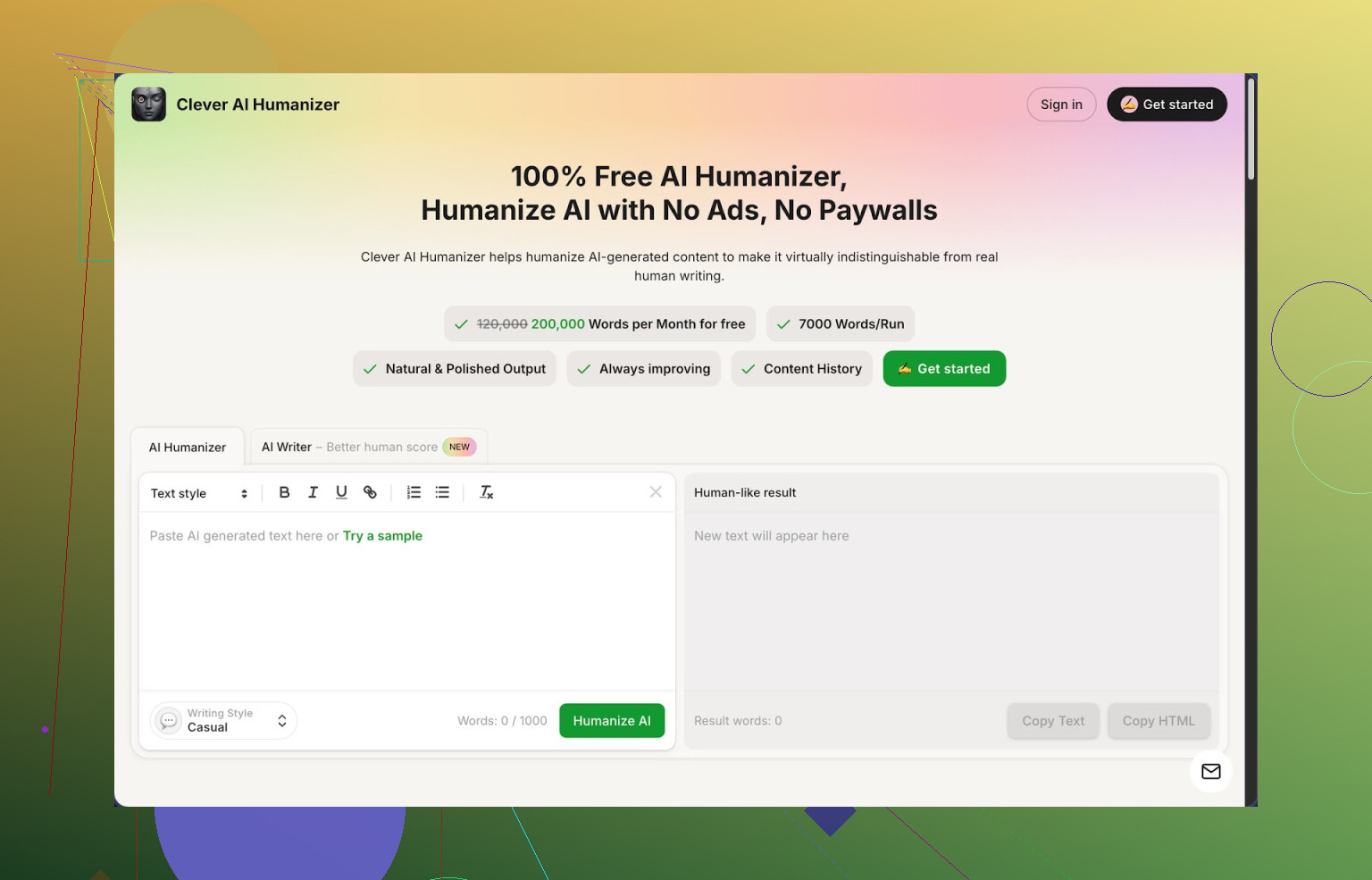
Link: https://cleverhumanizer.ai
I spent a weekend trying a bunch of “AI humanizer” tools because I was tired of getting stuff flagged as 100% AI on detectors. Out of everything I tried, Clever AI Humanizer is the one I keep going back to, mostly because it is free and has a generous limit, so I do not have to think about credits all the time.
Here is what I saw in actual use.
I pushed three different test texts into it, all written by GPT-style models. I used the Casual mode each time. Then I ran the outputs through ZeroGPT. All three came back as 0% AI on that detector. That does not mean it will always beat every detector, but on that specific setup, it passed cleanly.
The limits are not small.
- Up to about 7,000 words in one pass
- Around 200,000 words per month for free
For me, that covered long articles, essays, and some client drafts without hitting a wall. If you write a lot each day, you will hit it at some point, but for personal use and light client work it was more than enough.
How the main “Humanizer” behaves
You paste your AI text, pick a style:
- Casual
- Simple Academic
- Simple Formal
Then you hit go and it rewrites the whole chunk into something that sounds less robotic. The goal seems to be three things at once:
- Break common AI patterns
- Smooth the flow
- Keep the original meaning mostly intact
I tested this by giving it:
- A stiff “essay” style answer
- A keyword-heavy SEO blog draft
- A technical explanation full of repetition
I compared the original with the humanized version side by side. In all three, the tool kept the structure and main points, but:
- Sentences changed length
- Phrasing varied more
- Filler phrases got reduced
You should be aware of one thing though.
The output is often longer than what you pasted in. It adds explanation, breaks up sentences, sometimes repeats a point in different words. That looks intentional to break AI patterns, but it will annoy you if you are trying to stay under some tight character limit.
Other parts of Clever that I tried
- AI Writer module
This is a built‑in generator. You give it a topic like “why personal knowledge bases help programmers” or “pros and cons of remote work for designers”. It outputs a draft, then you can send that draft straight through the humanizer in the same interface.
Compared with feeding an external GPT output into it, I got slightly better scores on detectors when I kept everything inside Clever’s system. I suspect the texts are already tuned for their own humanizer.
Use case:
- Full blog post from scratch
- Quick essay for school
- First draft for landing page copy
Then you clean it up with the humanizer and grammar checker.
- Grammar Checker
Nothing fancy visually. You paste the text and it fixes:
- Spelling
- Punctuation
- Some clarity problems
I used it on a 1,500 word article that had been written by a non-native speaker. It caught:
- Missing commas
- Wrong verb tenses in a few places
- Awkward phrase chains
It is not at Grammarly level in terms of suggestions, but for free, it was enough to make a draft look “ready to post” for a blog or a LinkedIn article.
- Paraphraser
This one rewrites input text while keeping the same meaning. I used it for:
- Rephrasing product descriptions to avoid duplicates
- Rewriting a newsletter intro so it did not sound like my older ones
- Adjusting tone from stiff to more neutral
It stays closer to the source than the main humanizer does. It felt better for:
- SEO tweaking
- Making second versions of the same explanation
- Avoiding copy/paste reuse
Workflow that ended up working for me
For longer pieces:
- Draft in any AI or in Clever’s own writer
- Run the text through the Humanizer in Casual or Simple Academic
- Run the output through the Grammar Checker
- Spot check for weird phrasing or sudden tone shifts
After a few runs, I noticed:
- Fewer flags from ZeroGPT
- Better flow for blog-style content
- Less obvious “AI” feel in intros and conclusions
Good parts
- Free tier is generous, I never hit the cap for normal weekly use
- Supports long texts so you do not have to split articles into tiny pieces
- Humanized results keep the meaning close to what you wrote
- Everything is in one place, humanizer, writer, grammar, paraphraser
Annoyances and limits
- Not all detectors are fooled; some still mark parts as AI
- Word count often increases after humanization
- You still need to do a light manual edit if you care about your own style
- Styles are basic, Casual, Simple Academic, Simple Formal, no niche tones
If your main concern is: “I use AI to write, but the text sounds off and detectors scream at it”, then this tool helps at least part of the way without asking for a card.
More in‑depth review, with screenshots and detection tests:
YouTube review of Clever AI Humanizer:
Some Reddit threads that go into other people’s setups and tools:
Best AI humanizers on Reddit
https://www.reddit.com/r/DataRecoveryHelp/comments/1oqwdib/best_ai_humanizer/
General talk about “humanizing” AI outputs
https://www.reddit.com/r/DataRecoveryHelp/comments/1l7aj60/humanize_ai/
9 Likes
If you want something that feels like a swap for Undetectable AI, you have a few free routes, each with trade‑offs.
-
Clever Ai Humanizer
Since @mikeappsreviewer already did the deep dive, I will only add this. Use it as a “post‑processor,” not a one‑click solution.
Practical setup that worked for client blogs:
• Generate content in your usual AI.
• Run it through Clever Ai Humanizer in “Casual” for blogs or “Simple Formal” for B2B.
• Then manually trim fluff, especially repeated ideas, because it tends to expand the text.
On my side, content that scored 80–100 percent AI on GPTZero dropped to 0–25 percent after a pass plus a quick manual cleanup. -
QuillBot (free tier)
Not a pure “humanizer,” more a paraphraser, but it helps break classic AI patterns.
Workflow:
• Split your article into small chunks.
• Use Standard or Fluency mode, not Creative.
• Turn off heavy synonym changes or you will get weird word choices.
Then you edit it to fix tone. Detection scores get mixed results, but it helps if you combine it with your own rewrites. -
Edit like a human, fast
Detectors look for patterny structure. You do not need a fancy tool every time. Quick manual tweaks that move the needle:
• Shorten some paragraphs, lengthen others.
• Add 1–2 short personal lines per section, like “I ran into this with a client last year” or “I see this mistake a lot in WordPress sites.”
• Remove generic openers like “In today’s digital age” or “It is important to note.”
When I spent 5–10 minutes doing only that, GPTZero scores often dropped by half. -
Open source “perturbers”
If you are ok with a bit more tech:
• Use a local LLM front end like LM Studio or oobabooga with a small model.
• Prompt it to “rewrite this to sound like a human blog writer, keep structure, change sentence rhythm.”
Not as polished as Clever Ai Humanizer, but it keeps you off third‑party detection blacklists and gives you more control. -
What I would avoid relying on
• Any tool that promises 100 percent undetectable across all detectors. That is not stable.
• Single‑click passes with no human review. Clients notice tone shifts and odd phrases faster than detectors do.
If you want one free tool to plug into a workflow today, Clever Ai Humanizer plus 5–10 minutes of your own editing gives you the closest feel to Undetectable AI for blogs and client work.
If you want something that feels like Undetectable AI without paying, I’d treat this as a stack of tactics instead of hunting for a single magic button.
First, quick note: I agree with a lot of what @mikeappsreviewer and @caminantenocturno said about Clever Ai Humanizer, but I wouldn’t lean on only that or any single tool if you care about client work and not getting burned later.
Here’s what I’d actually do:
-
Use Clever Ai Humanizer… but as a filter, not a crutch
- It’s probably the closest free alternative to Undetectable AI right now in terms of “paste → human-sounding → decent on detectors.”
- I’d use it mainly for:
- Long-form blog drafts
- Client content where you already know the structure
- I disagree slightly with the idea that you should always trust the detector scores after a single pass. Detectors change, and some of them learn common humanizer patterns. Treat the “0% AI” results as “nice bonus,” not “guarantee.”
-
Mix in your own fingerprints
This is where most people get lazy and why detectors still nail them. Do this after Clever Ai Humanizer or whatever tool you pick:- Add 1–2 personal or contextual lines per section:
- “I’ve seen this a lot with smaller ecom brands…”
- “If you’ve ever tried to fix this in WordPress at 2 a.m., you know the pain.”
- Change some headings to your natural style (shorter, weirder, slightly informal).
- Delete generic AI filler like:
- “In conclusion”
- “In today’s fast-paced digital world”
You’d be surprised how far 5 minutes of this goes.
- Add 1–2 personal or contextual lines per section:
-
Use a second free tool as a “pattern breaker”
To avoid your content looking like it all came from the same humanizer:- Run only the intro and conclusion through something like QuillBot or a local LLM rewrite, then manually merge.
- The body text can be from Clever Ai Humanizer, but the “edges” (hook and wrap-up) should feel distinctly yours. Detectors and humans both focus there more.
-
Rotate your workflow a bit
If you’re doing regular client work, don’t run every piece through the exact same pipeline. That’s how you build a detectable pattern at scale. For example:- Piece A: GPT draft → Clever Ai Humanizer → light edit
- Piece B: GPT draft → your manual rewrite of first 30% → Clever Ai Humanizer only on middle
- Piece C: Draft in Clever’s own writer → Humanizer → manual trim
-
Hard truth part
- Any tool promising “undetectable forever” is selling vibes, not reality.
- If a client explicitly bans AI, using humanizers to sneak around that is a risk, no matter what detector score you get.
- The safest long-term play is: AI for structure and ideas, you for voice and final shaping.
So yeah, if you want a straight Undetectable AI alternative:
- Clever Ai Humanizer is your best free bet right now for volume + natural tone.
- Pair it with minimal manual editing and occasionally a second tool, and your stuff will usually pass basic AI checks for blogs and client content without sounding like every other chatbot on the internet.
It’s more “free workflow” than “free button,” but that’s what actually holds up.