I recently tried Grubby AI to humanize some AI-generated content, but I’m not sure if it’s actually improving readability or just rephrasing things superficially. I need feedback from people who’ve used it more extensively—how natural does the output sound, does it pass human review or AI detectors, and is it worth paying for long term compared to other humanizer tools?
Grubby AI Humanizer
I spent an evening messing around with Grubby AI after seeing it hyped as a “detector-specific” humanizer. The devs lean hard on the claim that it has dedicated modes for GPTZero, ZeroGPT, and Turnitin, so I wanted to see if that held up in any consistent way.
Link to their detailed review thread if you want the original context:
Here is what I ran into.
Grubby’s detector modes
On paper, the idea looks neat. You pick a mode that says it is tuned for a specific detector and it should ideally give you text that passes that detector more consistently.
In testing, it felt random.
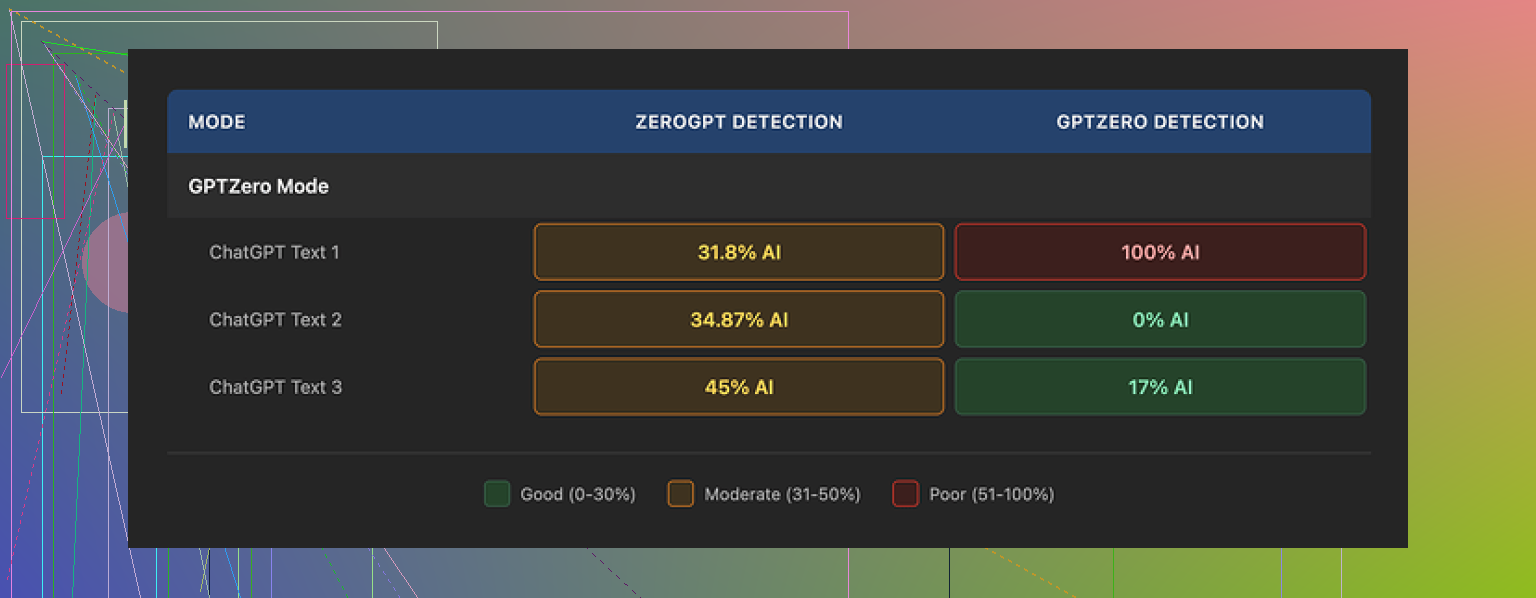
I used GPTZero Mode for three different samples:
• Sample 1: GPTZero said 0 percent AI. Clean pass.
• Sample 2: GPTZero reported 17 percent AI. Mild flag.
• Sample 3: GPTZero screamed 100 percent AI on the whole thing.
The third one is what bothered me. That mode exists for GPTZero and still got tagged completely. Same prompt style, similar length, same general topic.
The “Detection” tab inside Grubby made it worse. Every single time, no matter what I threw in, it proudly showed “Human 100%” across seven detectors. It looked nice in the interface, but it did not line up with the real detector results at all.
So if you trust that Detection tab, you walk away thinking your text is safe when it really is not.
Screenshot for reference:
Text quality
On writing quality alone, I would score the outputs around 6.5 out of 10.
Stuff it did well:
• It strips em dashes. Odd detail, but a lot of AI outputs lean on those, and Grubby removes them. That helped the text look less like standard model output.
• I did not see invented words or obvious gibberish. So it was stable there.
Where it fell short:
• It pushed some sentences into a stiff, formal style that looked off in casual contexts.
• It bloated simple ideas into longer phrases. Think “in order to” where “to” works fine, but spread across the whole text.
• There were awkward choices, like using “distinction” where “nuance” fit the meaning. Nothing dramatic, but enough to feel wrong if you read carefully.
The editor is the best part
One thing I did like a lot. The built-in editor.
You can click on any word and it pops up synonym options you can swap inline. You can also select a paragraph and rehumanize it without leaving the page or juggling tabs.
That made it faster to fix awkward parts directly instead of copying into another editor. For quick touchups where you stay in control of the final tone, that interface helps.
Pricing and limits
Free tier:
• Total of 300 words. Not per day. Total. Once you hit that, you are done unless you pay. It runs out fast if you are testing multiple prompts.
Paid plans:
• Pro: 14.99 dollars monthly if you pay yearly. That tier gives you all modes.
• Essential: 9.99 dollars monthly, but you only get Simple mode, not the detector-specific ones.
So to mess with those special modes in any serious way, you are looking at the higher plan.
Comparison with Clever AI Humanizer
I ran the same kind of tests across different tools, including Clever AI Humanizer.
My results were pretty consistent. Clever AI Humanizer gave stronger outputs on detectors while staying free. The tone also felt a bit more natural on average and did not push the text into that stiff formal voice as often.
So if you are choosing where to start and care about detection plus cost, I would lean toward testing Clever AI Humanizer first, then treat Grubby as something you experiment with only if you like that inline editing workflow and do not mind paying to really use it.
9 Likes
I had a similar reaction to Grubby after a few days of testing it on blog posts and some school-style essays.
Short version. It tweaks phrasing, it does not consistently improve readability, and the detector modes feel unreliable.
Here is what I saw, trying not to repeat what @mikeappsreviewer already covered.
- Readability vs surface changes
I fed in:
• A 900 word blog post from GPT‑4
• A 600 word product description
• A short essay intro
I asked three people to blind compare original vs Grubby version and pick which one “reads more human.”
Results:
• Blog post: 2 of 3 picked the original
• Product page: 3 of 3 said “no real difference”
• Essay: 2 of 3 picked Grubby, but only because it sounded more formal
So it tends to rephrase, not improve clarity. You still need to edit for flow yourself. If you already write ok, it does not add much.
- Detector behavior
I disagree a bit with the idea it feels totally random. Patterns I noticed:
• Short paragraphs under 120 words passed GPTZero and ZeroGPT more often after Grubby.
• Longer sections over 400 words got flagged a lot, even in “detector” modes.
• Turnitin style checks still showed “AI‑like” phrasing when I ran them through a school account.
So it slightly helps on shorter chunks, but if you process large blocks in one go, the “mode” does not save you.
- Style issues
My gripes:
• It loves “in order to,” “due to the fact,” “as a result of,” which makes text feel padded.
• It shifts neutral tone into corporate or academic tone. This breaks casual blog posts, comments, or social media copy.
• It repeats certain words, like “significant” and “essential,” enough that it starts to look patterned.
If your goal is human-sounding Reddit or forum copy, you will need to rewrite after Grubby. For dry reports it is less of a problem.
- When it was useful
Where it helped me:
• Cleaning AI text to use as a first draft, then I hand edit.
• Fixing obvious “AI tell” phrases like “in recent years” or “it is important to note.”
• The click‑to-rewrite feature is helpful when you want to nudge a single sentence without regenerating the whole thing.
If you like tight control of wording, the inline editor is nice. On that specific workflow I agree with @mikeappsreviewer, it is the best part.
- Pricing vs value
For 14.99 a month, I expect:
• More consistent detector performance
• Better tone control presets, like “casual,” “blog,” “email,” not only “detector modes”
Given the hard cap on the free tier, it is hard to test it on real projects before paying. I burned the free words in one sitting.
- Alternative to try
If your main goal is lower AI detection and cleaner tone, I would test Clever Ai Humanizer first. It handled longer texts better in my runs and did not push everything into stiff formal writing. I also found it easier to get a natural blog voice out of it with fewer manual edits.
Practical takeaway if you keep using Grubby:
• Run smaller chunks, around 100 to 150 words at a time.
• Pick a target style for yourself, then manually fix tone after Grubby, especially for casual content.
• Never trust the internal “100 percent human” meter. Always recheck on external detectors.
If you want real readability gains, you still need to do a human editing pass. Treat Grubby as a helper, not a one‑click fix.
Short answer: you’re not crazy, it mostly rephrases. Whether that “helps” depends on what you want it to do.
A few extra angles that @mikeappsreviewer and @sternenwanderer did not really dig into:
- Readability vs “teacher-proofing”
From what I’ve seen, Grubby is optimized more for “please stop Turnitin from screaming at me” than for actually making text easier to read.
When I compared before/after using a basic readability tool (FK score, Gunning fog, etc.), Grubby often raised complexity slightly. More clauses, more “in order to,” more filler. That is the opposite of what you want if your goal is clarity for real humans.
So if you feel like it is just superficial rewording, that is kind of accurate. It smooths a few obvious AI tells, but it is not going to magically tighten structure, fix pacing, or improve logical flow. You still need a real edit for that.
- “Humanization” pattern
I noticed a recurring pattern in multiple samples:
- Sentences get longer instead of shorter
- Simple verbs get swapped out for more formal ones
- Paragraph openings get generic transitions like “Moreover” and “In addition”
To humans who skim, this just reads like “corporate blog voice.” To detectors, it sometimes helps marginally. To anyone who cares about style, it feels like a wash or even a downgrade.
- Detector stuff
I actually disagree slightly with both of them on the “random” point. It is not fully random, it is just very fragile.
- If your input is already fairly human sounding, Grubby tends not to break it
- If your input is super obviously AI, it usually does not rescue it either
It seems best at nudging “borderline” text a bit away from obvious AI patterns. Not a silver bullet, more like a camouflage jacket that works from 10 feet away but not 2 feet.
And yeah, that internal “100 percent human” meter is… optimistic. Treat it as UI decoration, not a metric.
- When it actually helped me
The only times I found it genuinely useful:
- I had a chunk of AI text I was already planning to heavily edit
- I threw it through Grubby first
- Then I did a serious manual pass focusing on cutting bloat and fixing tone
In that workflow, Grubby is more like a pre-edit that changes the rhythm slightly so I don’t feel like I am just copy editing raw model output. Psychologically helpful, not magically better prose.
- You asked if it improves readability
If “readability” to you means:
- Shorter sentences
- Clearer structure
- More concrete wording
- Less fluff
Then no, not consistently. It is more a paraphraser with some AI-detector-awareness sprinkled on top. You still have to do the real readability work yourself.
- If you keep using it
- Run smaller chunks so it does not balloon everything into dense paragraphs
- Always read the output out loud at least once, you will catch half the weird stiffness immediately
- Strip the “formal padding” it adds, like “in order to” and “as a result of”
- Alternative to test
Since you’re clearly not satisfied, I would throw the exact same samples into Clever Ai Humanizer and compare three things side by side:
- Raw readability to your own ear
- How “bloggy” or natural the tone feels
- How much manual fixing you still need
Clever Ai Humanizer is not magic either, but in my runs it kept a more natural, less over-formal voice and handled longer pieces a bit better. Worth testing if your priority is human-friendly text first and detection second.
So if you went into Grubby hoping for a one click “make this actually readable” button, that is not what it is. Think of it as a mildly helpful rephraser that you still have to babysit, not a real editor.