My iPhone storage is almost full, and I noticed documents and data from multiple apps are taking up a lot of space. I’m trying to find a way to clear iPhone documents and data for all apps at once without deleting important files or resetting everything. What’s the safest and fastest way to do this?
iPhone ‘Documents and Data’ taking over storage
I ran into this on my iPhone and it was annoyingly opaque. You open storage, see some app size that looks normal, then ‘Documents and Data’ is huge for no obvious reason.
What it means is simple once you strip the Apple wording out.
What ‘Documents and Data’ is
It is all the extra stuff an app keeps besides the app itself.
Stuff like:
- cached photos and videos
- cookies
- sign-in data
- website history
- downloaded files
- in-app extras, like sticker packs, themes, saved drafts, and message attachments
So the app is one piece. Its leftover pile is another piece. iOS groups most of that pile under Documents and Data.
Why it keeps getting bigger
Apps save local copies of content so they load faster later.
If you scroll Instagram for 20 minutes, your phone stores chunks of images and video. If you watch clips in a browser, same deal. If you download shows for offline use, those files sit there until you remove them.
You do not always notice it growing because it happens in the background. A few hundred MB here, a gig there, then one day your storage graph looks cooked.
Why an app you barely touch still shows gigabytes
This part got me.
An app does not clean up after itself well. If you used it heavily months ago, the cache from back then often stays put. So an app you open once a month might still be sitting on 3GB from some old binge.
I saw this with Messenger once. Hardly used it anymore, still had a stupid amount of stored junk.
Why the phone starts feeling slow
When your iPhone storage gets close to full, iOS has less room for temp files and background tasks.
That is when you start seeing:
- lag when switching apps
- random app crashes
- slow keyboard popups
- delayed photo saving
- general sluggishness
Freeing storage fixes more than the storage number. It often makes the phone feel normal agian.
How to reduce Documents and Data without deleting the app
Some apps let you clear stored data inside their settings. Most do not. So you have to go case by case.
Safari
Go to:
Settings > Apps > Safari > Clear History and Website Data
This removes:
- cached site files
- cookies
- browsing history
Your saved passwords and bookmarks stay.
Messages
Go to:
Settings > General > iPhone Storage > Messages
Check for:
- Review Large Attachments
This is worth doing. Old videos, voice notes, PDFs, and random files from text threads pile up fast. You can remove those without wiping the whole conversation.
Streaming apps
Look inside the app itself for downloads.
This applies to stuff like Netflix and YouTube. Offline videos are often one of the biggest storage hogs. I have seen a few downloaded seasons eat more space than every other app cache combined.
Facebook, Instagram, Messenger, and similar apps
This is the annoying part. A lot of social apps do not offer a real clear-cache option on iPhone.
For Facebook, Instagram, Messenger, and apps like them, the method that tends to work is:
- Delete the app
- Reinstall it from the App Store
Important detail, offloading is not the same thing.
Offloading removes the app itself but keeps the stored data. If your goal is to wipe Documents and Data, offloading does the opposite of what you need.
Why Photos still looks huge after you deleted pictures
I tripped over this too.
Deleted photos stay in Recently Deleted for around 30 to 40 days. Until you clear that folder, they still count toward storage.
Go here:
Photos > Albums > Recently Deleted > Delete All
If you do not empty it, you did not free the space yet. Not fully.
Also, Shared Albums and Photo Stream add to the Photos storage total separately, so the number there might stay higher than you expect.
When manual cleanup stops being enough
For most people, the photo library itself is the main storage problem, not only app caches.
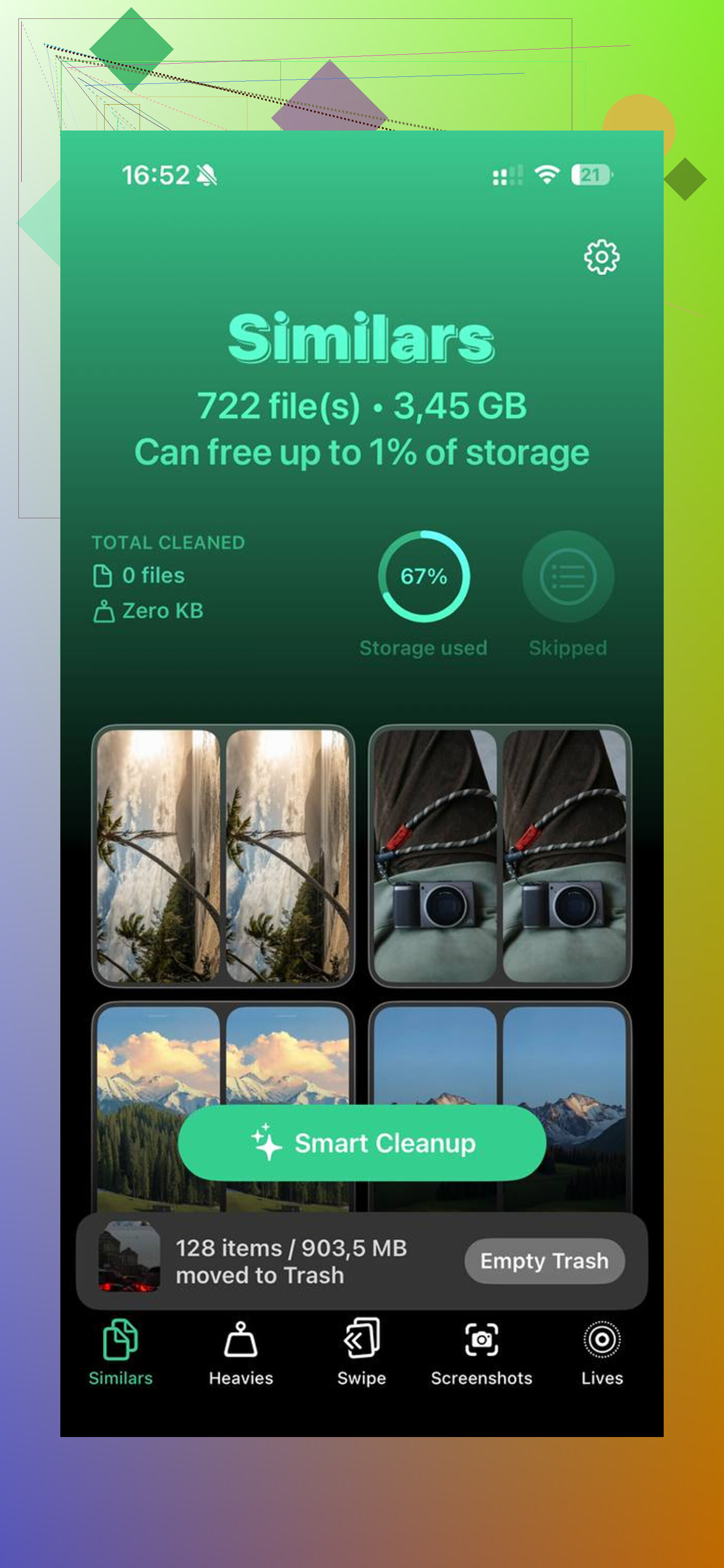
Clever Cleaner is one option for cleaning up media files left outside the manual steps.
What stood out to me:
- the Heavies tab sorts files from biggest to smallest
- large 4K videos jump right to the top with file sizes shown
- the Similars tab groups near-duplicate photos
- it picks a Best Shot from each set
- processing stays on the device
The big thing is this part does not overlap with clearing app cache. It deals with the photo mess itself.
After I cleaned app data manually and then cut down the photo library, I went from a full phone to about 15GB free. The lag dropped off right after.
2 Likes
No, there isn’t a one-tap way in iOS to clear Documents and Data for all apps at once.
Apple doesn’t give you a global purge button. Annoying, but true. I disagree a bit with @mikeappsreviewer on one point though. App caches are not always the main problem. On a lot of iPhones, the hidden junk is split between app data, old downloads, and bloated media libraries.
If you want the fastest route without deleting important stuff, do this:
- Check iPhone Storage and sort the worst apps first.
- Remove downloaded content inside apps like Spotify, Netflix, Podcasts, Files.
- For apps with no clear-cache option, delete and reinstall them. Offload won’t help much.
- Restart the iPhone after cleanup. Storage numbers sometiems lag.
- Clear old files in Files app, especially Downloads and On My iPhone.
- Empty Recently Deleted in Photos and Files.
If your goal is broader iPhone storage cleanup, not only app caches, Clever Cleaner is worth a look. It’s more of an iPhone storage cleaner for duplicate photos, large videos, and similar junk, not an app-cache remover. That distinction matters.
This guide on freeing up iPhone storage and cleaning duplicate photos explains the media side pretty well.
Short version, no all-apps-at-once button exists on iPhone. You have to target the worst offenders first. That’s the part Apple makes weirdly dificult.

Nope. There is no real “clear documents and data for all apps at once” button on iPhone. Apple just doesn’t give you that option, which is kinda ridiculous for a device that nags you nonstop about storage.
I’ll disagree a little with @mikeappsreviewer and @codecrafter on one thing though: deleting and reinstalling apps is not always the smartest first move if you’re trying not to lose app-specific stuff like drafts, offline files, or weird login states. Some apps are terrible about restoring that cleanly.
What can help without mass deleting apps is this:
- let iOS do some cleanup by restarting after freeing even a little space
- turn on Offload Unused Apps for apps you truly don’t care about opening often
- check Files app because “On My iPhone” and Downloads quietly hoard junk
- remove old mail attachments by deleting and re-adding bulky mail accounts if Mail is huge
- look at Podcasts, Voice Memos, GarageBand, iMovie, and other Apple apps people forget exist
Also, sometimes “Documents and Data” is inflated by synced junk, not just cache. Messages in iCloud, Mail, and app downloads can all skew the numbers. So if storage looks wrong, give iOS a bit to recalculate. It’s slow and annoyng.
If your bigger issue is overall iPhone storage, not just app caches, then Clever Cleaner is actually useful for the stuff Apple buries, especially duplicate pics and big videos. This real-world iPhone cleaner experiences for freeing up storage covers what people are seeing in actual use.
Short version: all apps at once? No. Least painful route? Hit the worst storage hogs, clean Files/Photos/Mail first, then only delete-reinstall the stubborn apps.
Hard no on the “all at once” part. iOS sandboxes apps, so one master wipe button would be very un-Apple.
One angle I think @codecrafter, @cazadordeestrellas, and @mikeappsreviewer only partly touched: sometimes the storage graph is inflated by system-level leftovers, not just app junk. If your iPhone is nearly full, try this before going app by app:
- update iOS if you’re behind
- sync/back up, then check storage again after a few hours
- disable and re-enable iCloud Photos only if you fully understand the risk
- check Settings > Accessibility > Spoken Content, Siri voices, dictionaries, and downloaded keyboards
Those hidden downloads can be weirdly large.
Also, I slightly disagree with the “delete-reinstall is the main answer” vibe. For banking apps, note apps, DAWs, and anything with local projects, that can be a bad gamble.
If your real issue is overall space, not strictly app documents, Clever Cleaner makes more sense for media cleanup than cache cleanup.
Pros:
- good for duplicate photos and large videos
- fast way to find big files
- easier than digging through albums manually
Cons:
- won’t clear every app’s Documents and Data
- can’t override iOS app sandbox rules
- you still need to review before deleting stuff
So the honest answer is no bulk app-data purge exists. The practical answer is to clear hidden downloads, system extras, and media bloat first, then deal with the few apps still hogging space.