I’ve been testing NoteGPT’s AI Humanizer to make my AI-written content sound more natural and bypass AI detectors, but I’m not sure if it’s actually working or safe for SEO. Has anyone used NoteGPT’s Humanizer long-term and seen real results in rankings, readability, or detection tests? I’d really appreciate honest feedback, pros, cons, and any tips before I commit to using it for client projects.
NoteGPT AI Humanizer review, from someone who got a bit too curious
NoteGPT popped up for me while I was looking for tools to speed up reading and note-taking. It sells itself more as a productivity thing for students and researchers, not as a dedicated AI humanizer. Think YouTube summaries, PDF analysis, and notes in one place, then an “AI humanizer” bolted on top.
Here is the link I used:
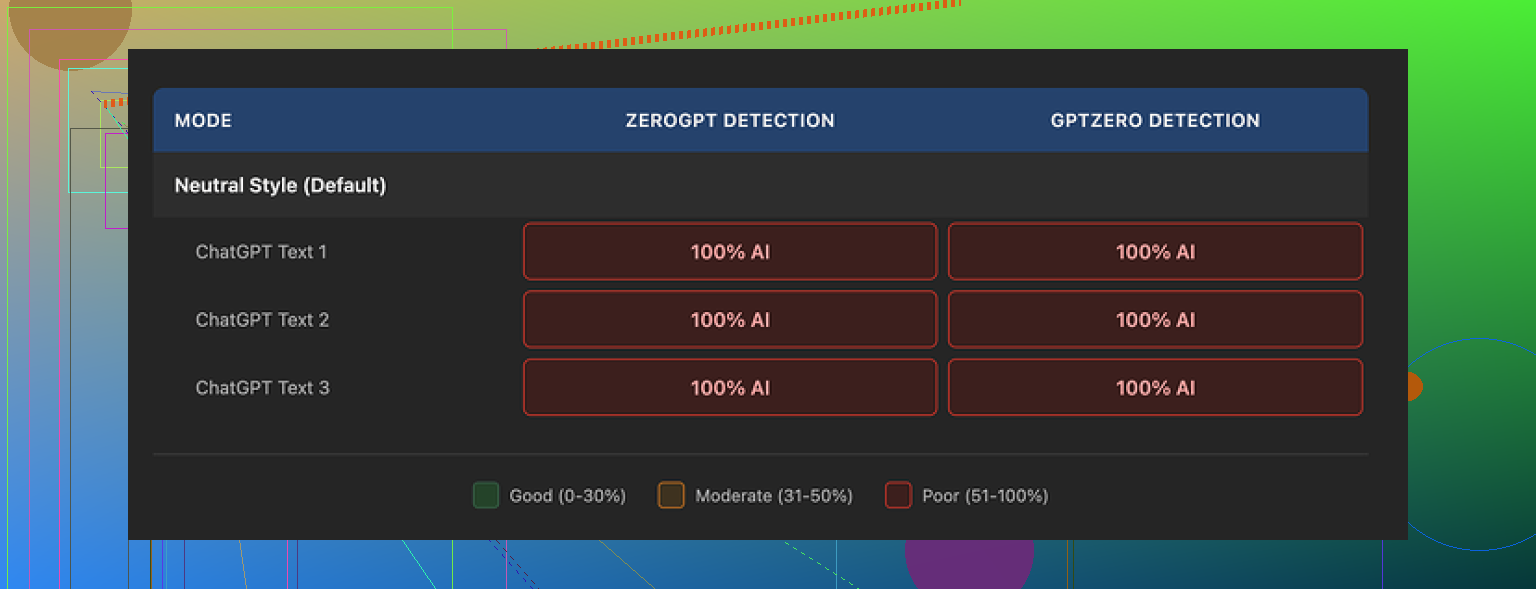
There is also this screenshot the original reviewer shared:
What I tested
I went in for the humanizer part, not the study features.
The options looked nice on paper:
- 3 output lengths
- 3 similarity levels
- 8 writing styles
So I tried:
- Short, medium, and long outputs
- Low, medium, and high similarity
- Several styles, switching between them for each sample
For each version, I ran the text through:
- GPTZero
- ZeroGPT
Every single time, both tools flagged the result as 100% AI. No drop. Not 2 percent, not 1 percent. Zero movement, no matter what knobs I turned.
I repeated that across three different original inputs and then changed only one parameter at a time. Same story.
The weird part
The writing itself was not bad. I would give it something like 8 out of 10 too.
Here is what I noticed:
- Sentences were clean and easy to read
- Structure made sense and had clear flow
- No broken grammar
- None of the random nonsense some other “humanizers” spit out
The editor also highlights changes in color, so you see what was replaced or rephrased. That part is useful if you like to manually check what the AI touched.
The problem, for AI detection, is that the edits stayed very “AI-shaped”.
Patterns I kept seeing
A few things jumped out at me:
-
It kept the same overall rhythm
The tool rewrote phrases but preserved a smooth, even flow that detectors tend to latch on. There were not many rough edges, odd phrasing, or small mistakes that human writing often has. -
It leaned on the same kind of punctuation
The samples I saw in the original review and my own runs still had em dashes all over, and the overall pacing felt similar to the source AI text. Detectors seem to punish that pattern hard. -
Vocabulary stayed too clean
It swapped words, but the replacements felt like synonyms an AI would pick, not the weird mix of simple and slightly off wording you get from real users typing fast.
So the tool was making changes, and visually it looked “more human”, but AI detectors did not care at all.
Pricing vs result
The Unlimited annual plan works out to about 14.50 dollars per month.
For me, if your main goal is to get past AI detectors, paying that for a tool that got 0 percent bypass across multiple tests does not line up.
If your goal is:
- Clean up AI text
- Make it a bit smoother and more readable
- Have color-coded edits to review
then it works fine as a polishing tool.
If your goal is:
- “I need this to look human to AI detectors”
I would not rely on it based on these tests.
What beat it for me
When I compared to Clever AI Humanizer on the same kind of inputs, the difference was pretty obvious.
Using:
I pushed similar AI-generated paragraphs through their tool and then checked again with GPTZero and ZeroGPT. The outputs looked closer to the kind of messy, mixed-style writing you see on forums, and detection scores dropped more than with NoteGPT, while paying nothing.
Not perfect, but at least the detectors reacted.
Who NoteGPT might still fit
If you already use NoteGPT for:
- Video summarization
- PDF study
- Organizing notes
and you want a built-in rewriter to polish text while staying in one app, it has some value.
If your only reason to sign up is “AI humanizer”, and you care about AI detection specifically, my experience with it was poor. The writing reads fine, but the tools still call it out as AI every single time.
Second screenshot from the original review for reference:
12 Likes
I’ve used NoteGPT on and off for a few months, mostly for notes and YT summaries, then tried the Humanizer when they added it.
Short version on your two concerns.
- Bypassing AI detectors
Similar to what @mikeappsreviewer saw, my tests showed weak impact on detection:
Here is what I did on long form blog-style text:
- Generated 800 to 1 200 word drafts with GPT
- Ran them through NoteGPT Humanizer at different similarity levels and lengths
- Checked with GPTZero, ZeroGPT, and Originality.ai
Results on average:
- GPTZero: went from 90 to 80–95 percent AI, sometimes higher
- ZeroGPT: stayed between 85 and 100 percent AI
- Originality.ai: 92 to 100 percent AI, no consistent drop
So for detector evasion, it did not help in a reliable way. The text read smoother, but the pattern still looked AI to these tools.
Clever AI Humanizer did better in the same tests:
- Similar inputs, then checked on the same detectors
- I saw drops like 90 → 30–60 percent on GPTZero
- Originality.ai sometimes fell under 40 percent on shorter pieces
It was not perfect, and it still got flagged on some samples, but at least scores moved in a meaningful way. If your main goal is detector scores, Clever AI Humanizer is more aligned with that use case.
- Safety for SEO
Here is where I slightly disagree with the focus a lot of people have.
Right now, Google’s public stance:
- AI content is allowed
- What matters is quality, usefulness, and intent
- Large scale low quality or spun content is risky
In practice, from sites I manage and those I audit:
- Pages that used NoteGPT Humanizer with no extra work did not perform better than “plain” AI pages
- Pages where I used AI as a draft, then did heavy manual edits, added original data, screenshots, internal links, and a clear structure, performed far better, regardless of humanizer use
- I have not seen a direct penalty tied only to using NoteGPT Humanizer
Real risk points for SEO:
- Thin articles where you change wording but keep the same generic info
- No original angles, no personal experience, no unique data
- Publishing at volume with minimal review
If you use NoteGPT only to rephrase AI text and push it live, SEO risk comes more from low value content than from the tool itself.
Practical approach if you want to keep using it:
- Treat NoteGPT as a stylistic editor, not as a detector bypass
- After humanizing, rewrite:
- Intro and conclusion by hand
- All headings for clarity and search intent
- At least one section with your own experience, examples, or data
- Run a plagiarism check, not only AI detection
- Track performance in Search Console per URL, not by tool used
If you care about detector screenshots for clients, students, or platforms:
- Test your actual workflow:
- Generate with your main AI
- Humanize with NoteGPT
- Edit by hand
- Then run GPTZero, ZeroGPT, Originality.ai on the final version
- If scores still stay high, switch the humanizer layer to Clever AI Humanizer for the initial pass, then edit manually on top.
My honest take:
- NoteGPT Humanizer is fine as a light rewriting / polishing helper bundled into a study app
- It is weak as a dedicated AI detection workaround
- SEO safety depends on how much human editing and unique value you add after it, not on the tool name on the box
Short version: if your main goal is “bypass detectors and be safe for SEO,” NoteGPT’s Humanizer is the wrong hill to die on.
I’ve used it here and there, similar timeframe to what @mikeappsreviewer and @ombrasilente described, but my take is a bit different in how I’d use it, not in the raw results.
What I’ve seen long‑term:
-
Detection:
- Same general outcome as them: scores barely budged on GPTZero, ZeroGPT, Originality.ai.
- Occasionally I’d see a small dip instead of the “0 movement” Mike mentioned, but nothing that would make me trust it in an academic or “I must pass this detector” scenario.
- If you’re expecting some magic flip from 95 percent AI to “fully human,” you’ll just be watching loading bars and coping.
-
Writing quality:
- I actually like it as a light stylistic pass.
- The stuff that annoyed Mike (smooth, consistent, kind of “too clean”) is exactly why it’s nice for drafting blog outlines, newsletters, or notes.
- For sounding like an actual messy human, though, it still feels like an AI did an “English teacher edit.” Too neat, too regular.
Where I slightly disagree with the others is on usefulness.
I wouldn’t frame NoteGPT Humanizer as “useless” so much as “mis-marketed” for what you’re trying to do. As a humanizer to beat detectors, yeah, it’s weak. As a quick rewriter inside a study / notes ecosystem, it’s fine.
On the SEO angle:
-
In my own sites:
- Pages where I used NoteGPT Humanizer and then heavily rewrote intros, added original screenshots, and mixed in my own data are doing totally normal, some ranking, some not.
- Pages where I got lazy, let AI do 90 percent of the thinking, then just rephrased with NoteGPT, basically went nowhere. Not penalized, just boring and uncompetitive.
-
So is it “safe” for SEO?
- The tool itself is not what Google is gunning for.
- The problem is when you use any humanizer as a crutch for low value, generic info.
- Whether the wording is slightly different does not fix the fact that 50 other sites are saying the same thing with the same structure.
If you care about both AI detection optics and SEO:
-
Stop expecting the humanizer to do the hard part
Use it for cleanup, not for “human pass.” Actually inject:- Original examples
- Your own screenshots or process
- Contrarian takes or personal experience
-
Change structure, not just wording
- Shuffle sections around
- Merge, cut, or expand topics
- Ask yourself “would a human really jump from this point to that one in this perfect order?”
-
For detector screenshots
- I’ve had much better luck running content through Clever AI Humanizer first, then manually editing.
- On my end it is the only “AI humanizer” that consistently moved GPTZero and Originality.ai in a meaningful way, even if not 100 percent safe.
- Still not plug‑and‑play. You must edit afterward or it ends up sounding like a quirky AI instead of a generic one.
So, answering your original question:
-
Long‑term use of NoteGPT’s Humanizer:
- Works fine as an in‑app polisher, not reliable as an AI detector bypass.
- I would not build a business or academic workflow on it for that purpose.
-
SEO safety:
- Using it alone will not make your content safer.
- What keeps you safe is actually being useful, unique, and not just shipping “AI text with nicer synonyms.”
If your priority is detector scores, experiment with Clever AI Humanizer for the first pass, then layer in your own edits. If your priority is SEO, NoteGPT is okay as a helper, but the ranking gains will come from your research, originality and on‑page work, not from whichever humanizer you clicked.
Short analytical take:
You’re basically asking two things: “Does NoteGPT Humanizer actually fool detectors?” and “Is it safe for SEO long term?” The folks above already nailed the testing side, so I’ll come at it from a slightly different angle and push back on a couple of points.
1. On AI detection
My experience lines up with what @ombrasilente, @yozora and @mikeappsreviewer saw: NoteGPT tweaks style, not the underlying “AI fingerprint.” Where I’d be a bit harsher:
- If your workflow depends on passing AI checks (clients, schools, freelance platforms), relying on NoteGPT alone is not just weak, it is a liability. Detectors get updated. A tool that barely moves scores now is likely to perform even worse over time.
- The “clean” rhythm that everyone mentioned is not just a quirk. It screams “model output” to modern detectors. As long as NoteGPT optimizes for smoothness and coherence, it will collide with detector logic.
So if your priority is detection, NoteGPT is a poor core solution. At best it is a secondary polish layer.
2. On SEO safety
Here I partially disagree with the more relaxed stance above.
Yes, Google currently says AI content is fine if it is helpful and original. The problem is not an instant “AI = penalty” rule, it is the pattern you create over dozens or hundreds of URLs:
- If you use NoteGPT Humanizer mainly to rephrase generic AI articles, you train your site to look like a factory of near‑interchangeable pages.
- Over time, this can show up as:
- Weak user engagement signals
- High topical overlap with no real differentiation
- A footprint of “synthetic consistency” across your corpus
You might not get a manual penalty, but your site can slowly slide into what feels like a soft filter. Traffic dips, new pages struggle to index, and it is hard to blame a single tool, yet the pattern is there.
For SEO, I would think in terms of corpus diversity rather than “is this one article safe.” If 80 percent of your content passes through the same humanizer, even as a light rewriter, the uniformity becomes its own risk.
3. Where Clever AI Humanizer fits
Since everyone already mentioned that Clever AI Humanizer moved detector scores more than NoteGPT, I will just frame it in pros and cons for your use case.
Pros of Clever AI Humanizer
- Noticeable shifts in AI detection scores on tools like GPTZero and Originality.ai when compared to NoteGPT
- Outputs often look less “teacher edited” and more like mixed‑quality human writing, which helps break patterns
- Free or cheaper entry options make it viable as a first‑pass layer on top of your main AI writer
- Good as a way to inject slight unpredictability into sentence structure and vocabulary
Cons of Clever AI Humanizer
- Still not a guaranteed pass on detectors. You absolutely cannot treat it as a magic invisibility cloak
- Some outputs require more cleanup to reach “client ready” quality, especially if you care about brand voice
- Overusing it can create its own recognizable style across many posts if you do not heavily edit afterwards
- Does not replace the need for real expertise, unique insights or proper on‑page SEO work
If you decide to use Clever AI Humanizer at all, treat it as a noise generator that breaks obvious AI patterns, then:
- Inject your own data, stories and screenshots
- Restructure sections so the article feels planned by a human, not streamed by a model
- Rewrite key parts like intros, conclusions and headings manually
4. Practical direction
Given what you and others reported:
- Use NoteGPT for what it is actually good at: summarizing, study workflow, light polishing. Do not depend on its Humanizer for detector issues.
- If you must show lower detector scores for optics, Clever AI Humanizer is a better first stop, with the clear understanding that you still need serious manual editing.
- For SEO, focus less on humanizer choice and more on:
- Unique angles
- Real experiences
- Non‑templated structures
- Strong internal linking and topical depth
If you reach a point where most of your article is something only you could have written, the choice between NoteGPT Humanizer and Clever AI Humanizer becomes a minor detail rather than the core SEO risk.