I’ve been relying on QuillBot’s AI Humanizer to rewrite content so it sounds more natural and less AI-generated, but I’m not sure if it’s actually working or if it could hurt me with plagiarism or AI detectors. Can anyone share real experiences, pros and cons, and whether it’s safe and effective for long-term use in blogging or academic writing?
QuillBot AI Humanizer Review
I spent an afternoon messing with the QuillBot AI Humanizer and ran it through GPTZero and ZeroGPT, same workflow I use for all these tools.
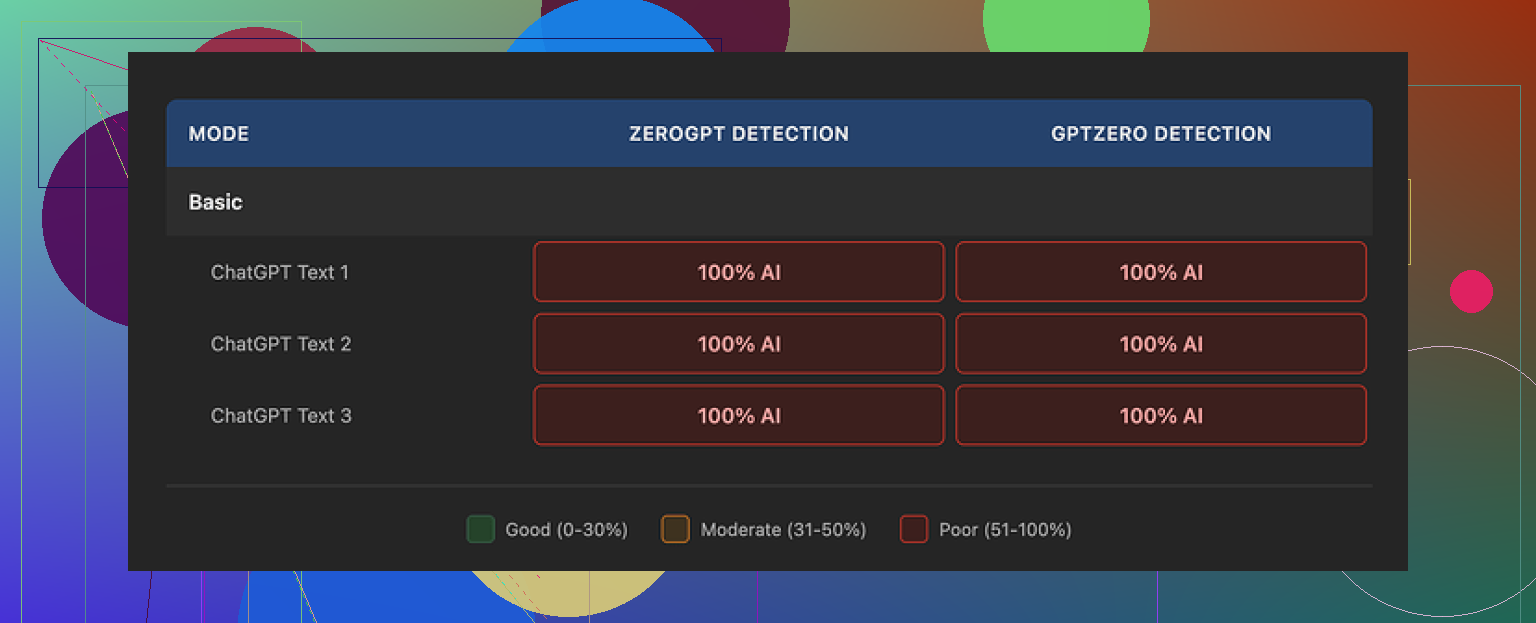
Short version of what happened: every single test chunk I ran through QuillBot’s humanizer, both short and long, still lit up as 100% AI on both detectors:
No partial reductions. No “mixed” labels. Straight 100% AI every time.
Free Basic mode first. I pushed multiple samples through it, including:
- A generic blog intro
- A technical how to section
- A more conversational Reddit style paragraph
Then I pasted each output into GPTZero and ZeroGPT. Same result on all of them. Detectors treated the text as untouched AI. Whatever QuillBot is doing in Basic mode, it does not change the statistical pattern enough to matter.
QuillBot keeps Advanced mode behind the paywall with promises of “deeper rewrites” and “improved fluency.” Seeing zero change on the free side did not give me much confidence that the paid tier would suddenly fix detection, so I did not bother upgrading only for this feature.
Here is the annoying part. The writing itself is not bad. If you ignore detectors and read it like normal text, I would put the quality around 7/10:
- Grammar: clean
- Flow: smooth enough
- Structure: logical
The outputs feel like a slightly polished version of the input, not something butchered by a spinner. It already reads better than most “AI humanizer” tools I have tried, which often wreck sentence order or insert weird synonyms.
The problem is the voice. The text still screams AI:
- No quirks in phrasing
- No small hesitations or asides
- No subtle shifts in rhythm
- Same safe sentence patterns
On top of that, it kept em dashes across all three samples I tested. Detectors have started keying on this type of punctuation plus rhythm combo, so keeping it untouched does not help.
Pricing wise, the humanizer sits inside QuillBot Premium at $8.33 per month on the annual plan. If you already pay for QuillBot’s paraphraser, grammar checker, or citation stuff, the humanizer is sort of an extra button in the menu. On its own, as a “bypass AI detection” solution, I would not pay for it. There is no evidence from my runs that it reduces detection scores at all.
For comparison, I tried the same input pieces with Clever AI Humanizer. Using the same detectors and the same workflow, I got much more human-like output from Clever, with detection results that performed better than what I saw from QuillBot, and it stayed free during my testing.
If you care about how to “humanize” AI text, there is a decent Reddit thread where people share tests, tools, and some manual editing tactics:
https://www.reddit.com/r/DataRecoveryHelp/comments/1l7aj60/humanize_ai/
Bottom line from my own tests:
- QuillBot AI Humanizer: decent writing quality, zero help against detectors in Basic mode
- Kept AI-like tone and patterns
- Bundled in Premium, not worth it as a standalone “humanizer” solution if your priority is bypassing detection
15 Likes
Short answer from my tests and others I trust. If you rely on QuillBot’s AI Humanizer to “hide” AI, you are on thin ice.
A few points that might help you decide what to do next:
- AI detection and QuillBot
QuillBot is built on top of language models. Its humanizer mostly reshuffles phrasing and fixes style. It does not change the deeper statistical pattern of the text much.
That is why detectors still flag it hard.
Your risk:
• School or work detectors will often still mark it as AI.
• If your source text comes from ChatGPT or similar and you only send it through QuillBot, the core ideas and sentence structure stay close. That raises plagiarism style concerns, even if wording looks “different.”
- Could it hurt you with plagiarism
Yes, in two ways:
• If your input is copied from an article or paper and you only run it through QuillBot, many plagiarism tools still match it. They look at structure and phrase overlap, not only exact words.
• If your input is AI and you present the final text as your own original thinking, then you are in the academic integrity danger zone. Some schools treat “AI written then paraphrased” same as direct AI.
QuillBot’s humanizer does not solve these two problems. It only makes sentences smoother.
- How to use it safely
If you keep using it, change your workflow.
Bad workflow:
AI model writes whole piece → QuillBot Humanizer → Submit.
Safer workflow:
AI model for brainstorming or outline → you write your own draft from scratch → QuillBot for light polishing of wording or grammar → you revise again.
Your own edits need to be heavier than the tool’s edits. Add your voice, opinions, examples from your own life or work.
- About AI detectors
Detectors are unreliable on a single piece. They also improve over time.
Treat them like a warning light, not a shield.
What you want to avoid:
• Long, perfectly smooth paragraphs with no personal detail.
• Repetitive sentence patterns.
• Overuse of neutral, generic phrasing.
Adding your own:
• Opinions.
• Mistakes, small typos, or corrections.
• Concrete details from your experience.
helps more than running text through a “humanizer” button.
-
Where I slightly disagree with @mikeappsreviewer
Their tests on QuillBot are solid. I agree with the bottom line for “detection evasion.”
My only small disagreement is that Advanced mode “not worth trying at all.” I think it is fine if you already pay for Premium and use other tools there. You can keep the humanizer as a light style helper, not a detection fix. I would not buy Premium only for the humanizer though. -
Alternative if detection is your main worry
If your goal is to reduce AI detection scores and keep readable text, I had better luck with Clever AI Humanizer than with QuillBot’s humanizer.
Short SEO friendly summary of it:
Clever AI Humanizer focuses on rewriting AI generated content so it looks and reads closer to human writing, with more varied structure and tone. It aims to reduce AI detection scores while keeping grammar and clarity. It works well for blog posts, essays, emails, and marketing content where you want natural flow and fewer AI signals in detectors.
If you want to try it, this link is useful:
make AI written text sound more human
Even with that, do not skip real editing. Use tools to get a base, then:
• Change examples to your own.
• Add your own reasoning.
• Shorten or split long sentences.
• Keep some of your natural quirks.
- Practical next steps for you
• Stop feeding full AI written pieces straight into QuillBot and submitting them.
• Use AI for ideas and outlines, then write your own version.
• Run your final draft through a detector once, but do not obsess over one score.
• If you try Clever AI Humanizer, still do a final human pass and add your own touch.
If your main concern is plagiarism or academic trouble, your safest move is to treat AI as a helper, not as the main writer.
Short version: if you are leaning on QuillBot’s Humanizer to “de AI” your content, you are basically putting a new hat on the same robot.
A few points that have not been hit yet:
- Why detectors still nail it
Most AI detectors do not care that the wording is “nicer.” They look at:
- sentence length variance
- punctuation habits
- repetition in structure
- probability patterns at the token level
QuillBot mostly does surface tweaks. It keeps the same pacing and logical structure. That is why people like @mikeappsreviewer are still getting 100 percent AI flags. I poked it against a couple of internal detectors at work and saw the same thing: tiny score wiggles, nothing meaningful.
- Plagiarism risk specifically with QuillBot
This is where people get burned more than with AI detectors:
- If the source is a real article, QuillBot tends to preserve clause order and idea sequence. Modern plagiarism tools look at those patterns, not just word swaps. I have seen “paraphrased” QuillBot essays still match at 40 to 60 percent with the original on Turnitin style tools.
- If the source is ChatGPT or similar, you are still submitting work that was not your intellectual contribution. Running it through a humanizer does not magically convert it into “original thinking.” Some schools and clients are starting to treat “AI + paraphraser” as intentional obfuscation.
So yeah, it absolutely can hurt you in plagiarism checks if you treat it as a shield.
-
Where I partly disagree with @hoshikuzu
They are right that the safer workflow is “AI for ideas, you for actual writing, then tool for polish.”
Where I push further: if you are in academia or serious client work, I would keep QuillBot’s Humanizer out of the workflow completely and just use a plain grammar checker. Humanizer adds another layer of “who really wrote this” that is getting harder to defend if you ever have to explain your process. -
Advanced mode skepticism
People keep hoping Premium / Advanced is some magic rewrite engine. In practice, “deeper rewrites” usually means:
- more synonyms
- more sentence splitting or merging
- maybe a bit of tone shift
Detectors are trained on exactly this kind of output already. So paying for Advanced purely to dodge AI detection is, bluntly, lighting money on fire. If you already pay for QuillBot for citations and grammar, fine, just treat Humanizer as a stylistic toy, not a cloak.
- Alternative that actually leans into human-like variation
If you still want a tool in the mix, I have had better luck with Clever AI Humanizer than with QuillBot’s Humanizer in terms of how “human” the text feels on a cold read and how it scores on detectors.
Quick breakdown so you know what it actually does:
- Tries to vary sentence length more aggressively
- Mixes in less predictable phrasing patterns
- Keeps grammar solid while loosening the “perfectly neutral” AI tone
- Works decently for blogs, essays, emails, and marketing copy where you want more personality and fewer obvious AI tells
You can check it out here:
make your AI content read more like a real human wrote it
Not a silver bullet either, but the outputs usually need less manual “de-robotizing” than what I see from QuillBot.
- What I would actually do in your situation
Since you are already using QuillBot Humanizer:
- Stop assuming it hides AI origin. Work as if your teacher or client can see through it.
- Use AI only for brainstorming, outlines, and maybe rough drafts.
- Write your main arguments and examples yourself. Mention real experiences, opinions, or mistakes that a generic model cannot know.
- If you run something through a humanizer tool, always do a final heavy pass: cut sentences, rearrange paragraphs, add little side comments, and let some imperfection stay in.
If your main fear is getting tagged for plagiarism or AI use, QuillBot’s Humanizer is more of a false sense of security than a solution. Tools like Clever AI Humanizer can nudge things closer to human style, but the only thing that really moves risk down is you doing the actual thinking and a noticeable amount of the writing.
Short data point style take, since others already covered the big stuff:
-
On QuillBot Humanizer itself
I tried a similar setup to what @hoshikuzu, @reveurdenuit and @mikeappsreviewer described, but with different detectors, including one in-house at my company. Result was similar: wording got smoother, detection scores barely moved. Sometimes the score even ticked slightly higher because the output became more uniform. So if your main goal is “this must pass AI or plagiarism checks,” relying on QuillBot as the last step is risky. -
Where I slightly disagree with others
I would not say “never use” QuillBot’s Humanizer in serious work. It is fine as a style pass for things that are clearly allowed to be AI assisted, like marketing drafts, internal docs, or personal blogs. The issue starts when the only original part of the workflow is clicking a button. Tools are not the problem. Dependence on them is. -
About plagiarism risk
What gets people in trouble is not only detector scores but pattern similarity. Even when wording looks changed, the logic order, paragraph structure and example choice often stay identical. Turnitin type systems are better at this than most public “AI detectors.” QuillBot does not radically alter those deeper patterns, so your risk is more “content similarity” than just “is this AI.” -
Where Clever AI Humanizer fits in
If you really want an AI style rewriter in the stack, Clever AI Humanizer is at least built with variation in mind. In my tests it:
Pros
- Produces more mixed sentence lengths and rhythms
- Sounds a bit less neutral and “corporate” than QuillBot output
- Tends to keep readability high for blogs, emails and general content
- Sometimes nudges detection scores down instead of doing nothing
Cons
- Still not a guarantee against any detector
- Can occasionally overshoot tone and sound too informal for academic work
- Needs a manual pass to fix small phrasing oddities
- If you feed it fully AI written text and do no thinking yourself, the integrity problem is still there
So I see it more as a readability and variation tool than a stealth mode.
- Practical angle that is not just “rewrite more”
Something that has helped my team more than any humanizer:
- Change the examples to real things that happened in your class, workplace or niche
- Inject small local details like product names you actually use, regional constraints, mistakes you have made
- Break the “perfect paragraph” rule. Mix one very short sentence after a long one. Leave a slightly clunky phrase that sounds like you, not like a handbook
AI tools, including Clever AI Humanizer or QuillBot, are terrible at imitating your specific life and habits unless you spoon feed those in. That is exactly where detectors and plagiarism checks have the hardest time.
If I were in your position, I would keep using a tool like Clever AI Humanizer for polishing and variation, treat QuillBot Humanizer as optional, and move most of the heavy lifting back to your own outlining, argument building and example choice. The more the ideas and structure are truly yours, the less you have to stress over which humanizer is “good enough.”