I used to rely on StealthWriter AI for rewriting and polishing content, but it’s become unreliable and I can’t justify paying for something that keeps breaking. I’m looking for the best free tools or websites that offer similar stealth rewriting, paraphrasing, and AI writing features without obvious AI detection. What are you using now that works well and is actually free or has a generous free tier?
- Clever AI Humanizer, my take in 2026
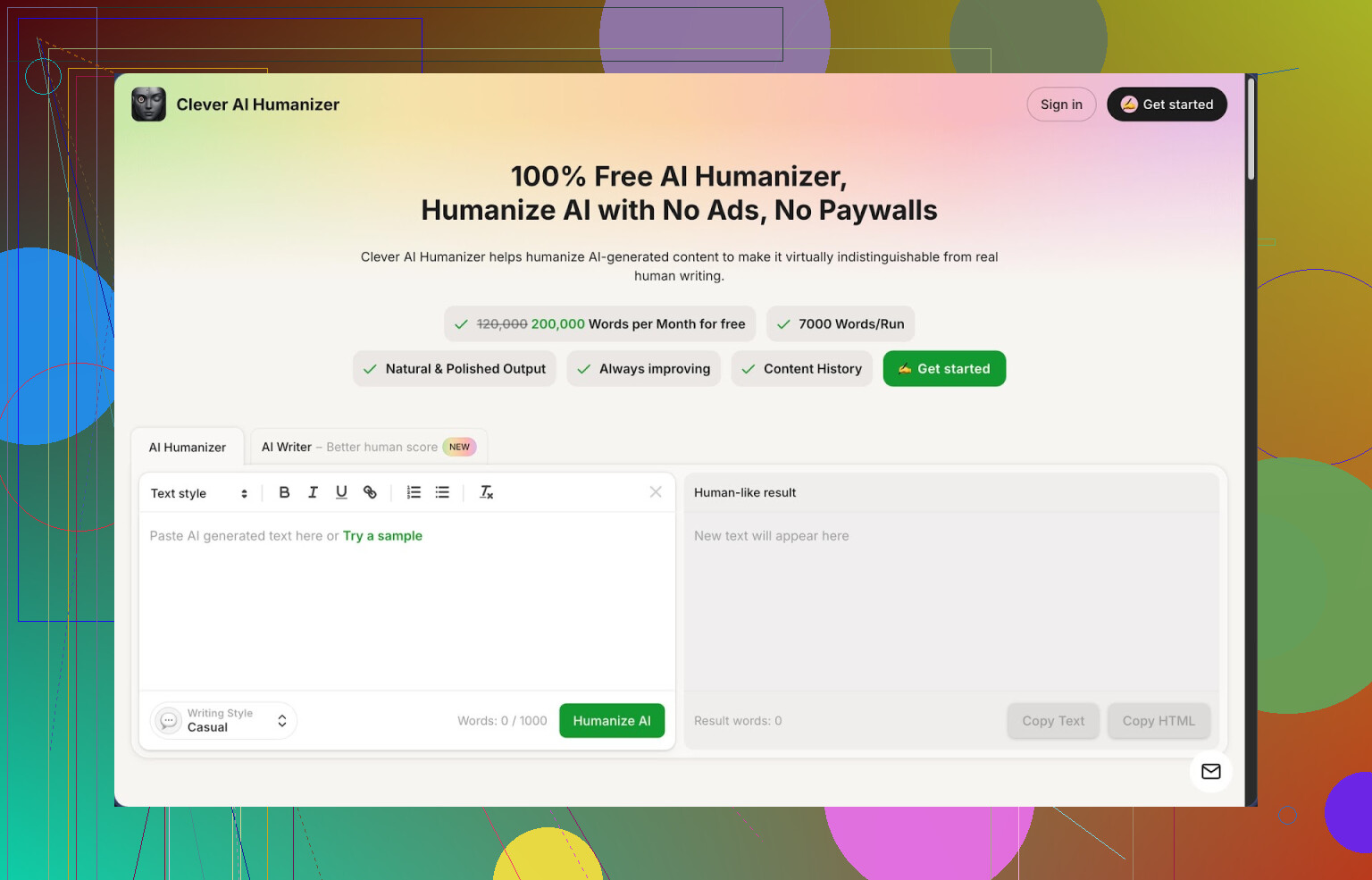
I’ve been bouncing between a bunch of “humanizer” tools this year, and I keep ending up back at this one:
Not sponsored. No affiliate junk. I was trying to find something that did not eat credits every time I blinked, and this is the only one I found that gives a flat 200,000 words per month for free, with up to 7,000 words in a single run. Three styles in there right now: Casual, Simple Academic, Simple Formal, plus an integrated AI writer.
I ran three different test texts through it using the Casual style and then checked all of them with ZeroGPT. All came back as 0% AI in my tests. That does not mean it will dodge every detector forever, but it did better than the others I tried on the same samples, under the same conditions.
What pulled me in was not the marketing, but the limits. I write a lot of junk drafts with AI first, then I massage them. With this tool I rewrote whole articles without stressing about tokens or surprise paywalls. For bigger projects, that matters more than some “premium” interface.
How I use the main humanizer
My usual workflow looks like this:
- I drop in raw AI text from ChatGPT or Claude.
- I pick “Casual” if it is a blog or email, “Simple Academic” if it is a school-style paper, or “Simple Formal” if it is client facing.
- I hit the button and wait a few seconds.
Output is not magic, but it strips a lot of the robotic phrasing and repeats. The wording tends to shift enough that most of the obvious AI fingerprints go away, while the original point stays intact.
I tested it with:
- A 1,200 word blog post about password managers.
- A 2,000 word “academic” style essay for a friend.
- A product how-to document.
In all three, the structure survived. The tool did not mutilate the meaning like some spinner tools do. It reads closer to something I might write after a fast first draft, which is about what I want from a humanizer.
The extra modules I ended up using
At first I only wanted the humanizer part. Then I ended up using the other panels more than I expected.
-
Free AI Writer
If I am starting from zero, I write a 1–2 sentence prompt in their AI Writer, let it spit out an article, and then send that result straight into the humanizer, all in the same interface.
This gave the “most human” scores for me, because the writer and humanizer seem tuned together. My best runs on ZeroGPT were from this combo. -
Free Grammar Checker
This one is basic but useful. After humanizing, I run the text through the grammar checker. It fixes:
- Spelling
- Punctuation
- Some clarity issues
For short posts or emails, I skip external tools and end with this. Output looked clean enough to publish on a blog without embarrassment.
- Free AI Paraphraser
This is what I use when I already wrote something myself and want a different wording.
Use cases that worked for me:
- Rephrasing old blog posts for a different audience.
- Tweaking product descriptions so they are not clones across pages.
- Shifting tone from too stiff to more relaxed without losing key info.
It tends to keep the structure close while swapping out sentences in a way that does not sound like a random synonym spinner.
Why I keep it pinned in my browser
For my day to day, it acts like four tools in a single window:
- Humanizer
- Writer
- Grammar checker
- Paraphraser
I run them in sequence when needed, or only one if that is enough. The big thing for me is that I do not need to juggle logins or manage credits across different websites. I open one tab, paste, tweak, export.
If you are writing:
- Essays
- Casual blog posts
- Simple reports
- Social posts
it slots into the workflow without much thought. It is not fancy, which in this case is a plus.
What is not perfect
I do not want to oversell it, because there are issues.
-
Some detectors still mark parts of the output as AI text. ZeroGPT gave 0% for my samples, but others are stricter or use different models. If you expect 100% undetectable text everywhere, on every site, that is not realistic.
-
Text length tends to grow. After humanization, most of my pieces ended up 10–25 percent longer. The tool adds small clarifications or rephrases in more words. If you have a hard word limit, you need to trim manually afterward.
-
Style is a bit “safe”. It does not inject personality for you. If you want strong voice, you still need to read through and add your flavor.
When it makes sense to use it
I reach for it in these situations:
- You rely on AI to draft content, and your school, editor, or client uses detectors.
- You are tired of juggling small free tiers scattered across a bunch of tools.
- You want one place to paraphrase, grammar check, and lightly humanize text without rewriting from zero every time.
If you want to go deeper into tests and screenshots, there is a post here with AI detection results:
Video and Reddit threads
There is also a YouTube review here if you prefer watching someone walk through it:
Reddit threads where people compare humanizers and share tricks:
Best AI Humanizers on Reddit:
https://www.reddit.com/r/DataRecoveryHelp/comments/1oqwdib/best_ai_humanizer/
General thread about humanizing AI output:
https://www.reddit.com/r/DataRecoveryHelp/comments/1l7aj60/humanize_ai/
8 Likes
If StealthWriter keeps breaking on you, I’d drop it and build a simple, free stack instead. You get more control and you are not stuck when one tool dies.
Here is what has worked well for me.
- Clever Ai Humanizer
I know @mikeappsreviewer already talked about it, so I will not repeat the whole workflow. I use it in a slightly different way though.
My setup:
• I paste AI text from ChatGPT.
• I pick “Simple Formal” even for blog stuff, because “Casual” sometimes inflates the word count too much for my taste.
• Then I manually trim paragraphs that feel padded.
What I like:
• 200k words per month is big enough for real work.
• Output keeps the structure, so you do not lose the logic of your draft.
What I do not fully agree with:
ZeroGPT showing 0 percent AI is nice, but I do not trust any single detector. I test samples on 2 or 3 tools and look for obvious patterns instead of chasing “0 percent” scores.
-
QuillBot free tier
Good for shorter rewrites when you want more control than a full “humanizer” pass.
Use the free paraphraser in “Standard” or “Fluency” mode.
Practical use:
• Take a StealthWriter style paragraph.
• Run it through QuillBot.
• Then run that result through Clever Ai Humanizer on a light style.
This double pass reduces repeated phrases and quirks from any one tool. -
ChatGPT with strict prompts
If you use the free GPT model, you can turn it into a focused rewriter.
Prompt example I use a lot:
“Rewrite the text to sound like a busy professional wrote it. Keep the same meaning. Keep sentences under 20 words. Remove filler. Avoid buzzwords. Do not add new ideas.”
Then I paste that into Clever Ai Humanizer or run a quick grammar pass.
You get tighter text than StealthWriter usually gave, at least in my tests. -
LanguageTool free grammar and style checker
StealthWriter tried to do polish in one step. I split it.
Workflow:
• Generate or rewrite content with ChatGPT or QuillBot.
• Humanize or paraphrase with Clever Ai Humanizer.
• Final pass in LanguageTool for grammar and basic style.
It catches stuff like double spaces, missing commas, and weird tense shifts that humanizers sometimes introduce. -
Google Docs “Suggesting” mode
Not a fancy AI, but useful.
Paste your “humanized” text into Docs.
Turn on “Suggesting”.
Then read once and fix:
• Long sentences.
• Repeated words like “also”, “so”, “therefore”.
It takes a few minutes, but you end up with something that feels closer to your own voice than StealthWriter’s auto-polish.
Simple replacement workflow for StealthWriter
If you want a near drop in replacement:
Option A, fast
- Draft in ChatGPT.
- Run through Clever Ai Humanizer.
- Quick grammar check in LanguageTool.
Option B, safer for heavy editing
- Draft in ChatGPT.
- Light paraphrase in QuillBot.
- Humanize in Clever Ai Humanizer.
- Grammar and style check in LanguageTool.
- Final skim in Google Docs.
You asked for free tools. All of these have free plans that are usable if you do not process book-length stuff every day. The only paid thing I keep around now is a backup editor, but for most posts and client docs, this combo fully replaced StealthWriter for me.
StealthWriter breaking all the time is honestly the least surprising plot twist of 2026.
Since @mikeappsreviewer and @espritlibre already covered Clever Ai Humanizer really well, I’ll just say this: if you’re specifically trying to replace “rewrite + polish” in one place, Clever Ai Humanizer is probably the closest free, realistic swap right now, especially with that 200k words/month. I personally would not bother hunting for a single tool that magically does everything better than that, because you’ll end up in the same StealthWriter trap.
That said, I’d actually not copy their exact stack, because stitching four tools together for every little blog post gets old fast. Here’s a different take that might fit you if you want fewer moving parts and still stay free:
-
Clever Ai Humanizer as the main engine
- Use it for the core rewrite / “make this sound like a person” step.
- Instead of using its writer, I’d start with whatever AI you already use (free ChatGPT, Gemini, etc.), then drop the draft into Clever Ai Humanizer.
- I disagree a bit with the obsession over AI detectors. Don’t chase 0 percent. Focus on clarity and tone first, then detection scores are usually “good enough” by accident.
-
LibreOffice or Word Online for polishing
Everyone keeps jumping to more AI, but a normal word processor plus built‑in spelling/grammar is still underrated.- Paste the humanized text into LibreOffice Writer or Word Online.
- Turn on spelling/grammar suggestions.
- Fix only the obvious stuff: typos, agreement, missing commas.
This replaces some of the LanguageTool / Grammarly dependence without yet another signup.
-
Hemingway Editor (web) for readability
If StealthWriter was your “make this less clunky” button, Hemingway is a decent free stand‑in.- Drop your Clever Ai Humanizer output into Hemingway.
- Target “Grade 6–9” readability for general content.
- Kill a few highlighted long sentences and passive phrases, ignore the rest.
It keeps your text from bloating into that vague, corporate sludge a lot of humanizer tools create.
-
For very short bits: DeepL Write (free)
For single paragraphs, emails, or product blurbs, DeepL Write can be cleaner than doing a full humanize cycle.- Paste your text.
- Pick a neutral tone, accept only the changes that actually sound like you.
This is nice when you just need “sound like a competent adult,” not full structural rewrites.
-
Stack in practice, replacing StealthWriter
Minimal replacement workflow I’d actually use:- Draft with any free AI.
- Run through Clever Ai Humanizer once.
- Quick pass in Hemingway for readability.
- Final spelling/grammar in LibreOffice / Word Online.
That covers the core stuff StealthWriter was doing: rewrite, smooth, slightly humanize, and polish, without gambling on yet another flaky paid tool.
And btw, while I respect what @mikeappsreviewer and @espritlibre suggested, chaining too many detectors and paraphrasers can make your text feel overcooked. One strong humanizer like Clever Ai Humanizer plus light manual cleanup usually beats a 5‑step “AI → AI → AI → AI → me” pipeline.
StealthWriter falling apart is basically the classic “single point of failure” problem. I’d treat this as a chance to cut your stack down and make it more robust instead of hunting for a 1:1 clone.
Here is a more opinionated take that fits with what @espritlibre, @viajantedoceu and @mikeappsreviewer already shared, but from a different angle.
1. Use one main rewriter, not three
Everyone already pointed at Clever Ai Humanizer and I agree it is the closest “click once, get human‑ish text” replacement for StealthWriter right now.
Pros of Clever Ai Humanizer
- Very generous free tier: around 200k words per month, which is real‑work territory.
- Handles long pieces in one pass, so you are not chopping posts into tiny segments.
- Multiple tones (Casual, Simple Academic, Simple Formal) that actually change the feel instead of just a label.
- Structure mostly survives, which is crucial if you care about logic and headings.
- Bundled writer, paraphraser and grammar checker so you do not need five browser tabs.
Cons of Clever Ai Humanizer
- Output often gets wordier, so you may need to tighten it if you have hard limits.
- Style is pretty “neutral professional,” not high personality, so you still have to inject your own voice.
- AI detectors are inconsistent across the board; it can score low, but nothing is “undetectable” everywhere.
- Web‑only workflow; if you love offline apps, it is not ideal.
Where I slightly disagree with what was said earlier: I would not stack Clever Ai Humanizer with two or three other paraphrasers every time. That overcooks the text and you end up with something nobody would naturally write.
Practical replacement for StealthWriter
- Draft with any free LLM.
- One pass through Clever Ai Humanizer on a suitable style.
- Then edit like a normal document. Done.
You probably do not need the double or triple AI passes unless you are doing something very specific like heavy niche paraphrasing.
2. Lean on classic tools for polish instead of more AI
Instead of chaining yet another AI tool after Clever Ai Humanizer, I would lean on “boring” tools that do not break every month:
-
A standard word processor with grammar suggestions
- Word Online or similar is enough.
- Fix the obvious: typos, subject‑verb agreement, junk commas.
-
A readability checker
- If your humanized output drifts toward long sentences, run a quick readability check and manually cut the worst offenders.
- Aim for something like mid‑school to early high‑school readability for blogs and general web content.
This is where I diverge a bit from the multi‑step stacks described by others. Splitting the job into “AI rewrite” plus “traditional polish” is usually faster and more stable than doing AI → AI → AI.
3. When Clever Ai Humanizer is overkill
For short stuff, like:
- A single paragraph
- An outreach email
- A product blurb
Using a full humanizer can be more than you need. In those cases, the free version of a strong grammar and tone tool or the free tier of a paraphraser can be enough. You paste, accept only the suggestions that sound like you and move on.
So I would reserve Clever Ai Humanizer for:
- Long blog posts
- Essays and reports
- Content where you started with obviously robotic AI text
And for micro content, just use a quick polish tool plus a manual pass.
4. About AI detectors and “0 percent” chasing
Here I strongly side with the more skeptical comments. Zero readings on any detector look nice in screenshots, but if you optimize for that you will:
- Inflate the text with fluff
- Lose your personal tone
- Spend way too much time reprocessing the same content
Use detectors, if you must, as a rough sanity check, not a target. If your text:
- Reads clearly
- Sounds consistent with your usual style
- Avoids cliché AI phrasing
you are already doing better than most StealthWriter‑style outputs, regardless of some percentage on a dashboard.
5. How this differs from what others suggested
- @mikeappsreviewer leans into a multi‑tool chain with QuillBot, Clever Ai Humanizer and LanguageTool. Solid, but more complex than you may need.
- @espritlibre focuses on building a stack around Clever Ai Humanizer plus classic editors and readability tools, which I mostly agree with.
- @viajantedoceu pointed out the fatigue of juggling four tools; that is exactly why I recommend a “one AI + boring editors” approach.
If StealthWriter was your “rewrite and polish in one click,” then:
Minimal free replacement that actually feels sustainable
- Draft with any free AI.
- Run through Clever Ai Humanizer once.
- Final clean‑up in a word processor with grammar and spelling on.
You get reliability, control and no surprise paywalls, without turning each article into a five‑tool science project.