I’m looking for advice on setting up an efficient remote workstation for creative work like graphic design, video editing, or animation. I recently started freelancing from home but my current setup is causing issues with performance and workflow. Could anyone recommend hardware, software, or specific tips for a smooth creative process when working remotely?
Building the Ultimate Remote Workstation for Creatives: A Community Deep Dive
Alright, so let’s clear the air right away: there’s no one-size-fits-all answer for setting up a remote workstation if you’re a creative pro. You’ve got to weigh what matters most—do you want buttery-smooth performance, airtight security, or a streamlined way to collaborate without jumping through a thousand hoops?
When Every Millisecond Counts: Chasing Speed
Ever tried editing 4K footage over a basic remote desktop? Yeah, don’t. For video editors, animators, 3D designers—anyone whose workflow feels like racing against their own deadlines—Parsec is your golden ticket. The latency is so low it almost feels like you’re plugged in locally. Every mouse click is instant, every frame stays sharp. But don’t expect chat bubbles or whiteboard scribbles—it’s pure speed, not a team playground.
Super-Secure, Big-Name Studio Stuff
Big film or VFX studio? Need something that locks down harder than Fort Knox? Enter Teradici (PCoIP). This one’s for those working behind ironclad firewalls, where “leaked frames” might get you a call from legal. The color fidelity is nuts, encryption is top-notch, but—pro tip—your budget better match your ambition. You’ll also need more than a home Wi-Fi setup. Think “dedicated IT department” levels of support.
The Quick-Fix: Light Duty and Client Demos
Now, if your day mostly involves tweaking designs, sharing screens with clients, or reviewing concepts, sometimes skipping the heavy-duty stuff is smarter. AnyDesk and TeamViewer are like those old reliable sneakers: not flashy, not built for sprints, but fine for casual strolls (i.e., basic presentations and client calls). Just don’t demand a marathon; once you fire up a heavy animation suite, expect a slideshow.
The Collaboration Game Changer
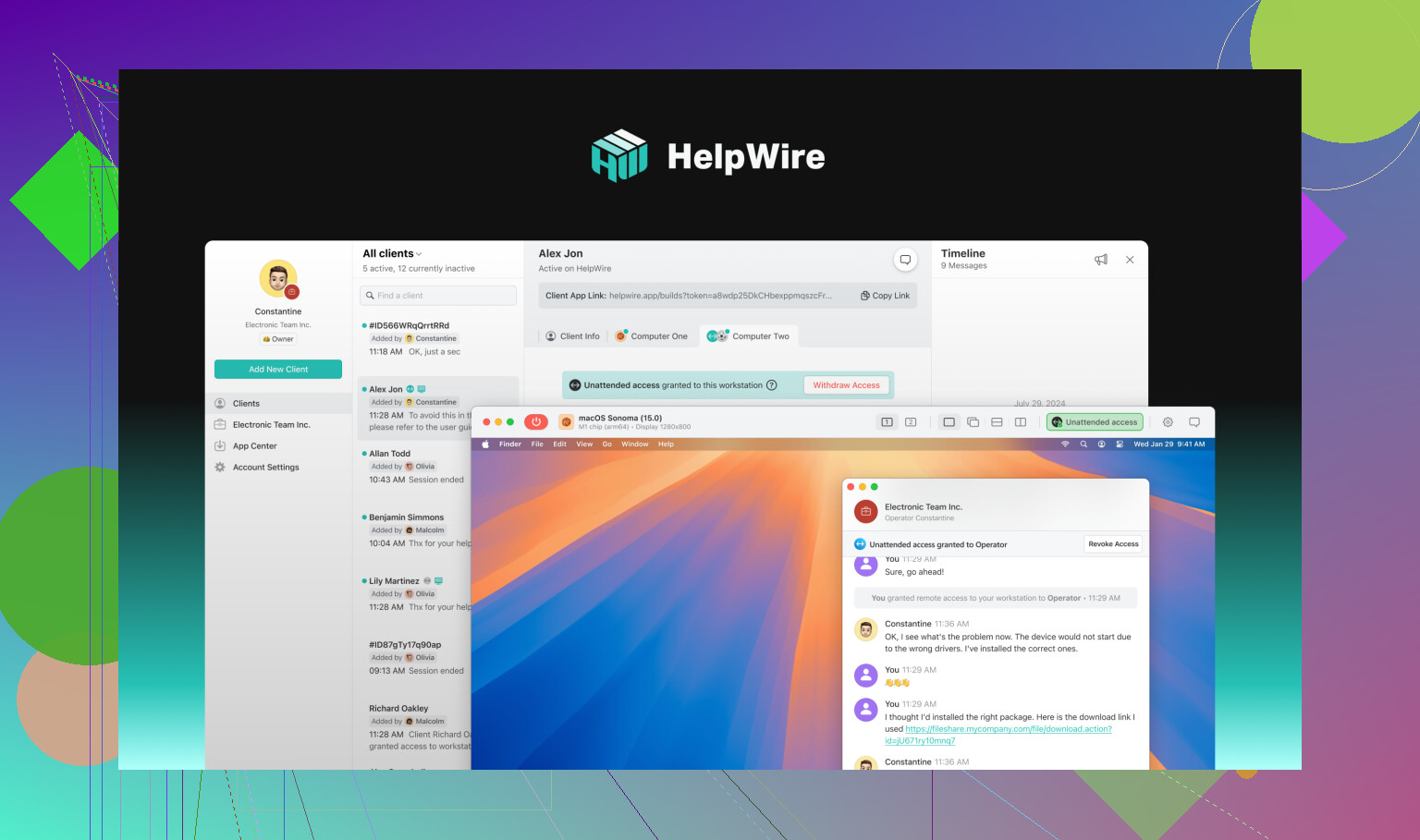
Let me tell you about a tool a lot of freelancers and small agencies are finally discovering: HelpWire, a remote workstation for creatives. It’s somewhere between clunky old remote support tools and high-flying performance apps. Here’s the best part: sharing your screen (safely) with teammates or clients is ridiculously simple. It’s built for folks bouncing feedback back and forth, or offering remote support without all the sticky security problems. Real talk: if you need raw GPU horsepower, this isn’t the king of the hill. But if your sweet spot is teamwork, quick show-and-tells, or remote fixes, it just works.
TL;DR (With Zero Fluff)
- Parsec: Like a Formula 1 car for creative workflows—fast, nimble, no frills, solo focus.
- Teradici: The armored truck; all about protection and enterprise-level performance, but you’ll pay (and set up) accordingly.
- HelpWire: The all-weather crossover—made for group projects, client input, and easy remote access.
- AnyDesk/TeamViewer: The Corolla—gets you there, but don’t expect magic on GPU-intensive projects.
Bottom line: Decide what you value most before picking your tool. If you’re straddling the line between “lone creative” and “remote team juggernaut,” don’t be afraid to mix and match—most of us do.
13 Likes
I’ll be straight up—setting up a top-tier home office for digital creatives is basically an Olympic sport now, with everyone chasing that frictionless workflow (and secretly wishing their clients would stop demanding “just one more revision”). @mikeappsreviewer covered a lot of the remote-access landscape, but honestly, obsessing over remote desktop solutions too early can be a bit of a rabbit hole—especially if your actual hardware, ergonomics, or workspace layout is the real bottleneck.
First off: nothing messes up your flow more than working on a laggy machine or with a cheap monitor. If you’re a graphic designer, animator, or hardcore video editor, invest in a high refresh rate display with true color accuracy (seriously, a proper IPS or OLED monitor is worth the cash), a desk that isn’t fighting you for elbow room, and a decent chair so your back doesn’t start popping like bubble wrap ten minutes in.
Also, storage: local SSDs are still faster than any remote solution for huge source files—don’t rely only on cloud sync unless you like waiting (a lot).
Now, as for the whole “remote creative workstation” thing, I mostly agree with the tools listed, especially Parsec for responsiveness. But HelpWire is something that’s been creeping up the ranks for me, especially if you’re juggling client work, feedback, quick troubleshooting, or collaborating on projects where not everyone is super techy. It’s not just about remote-in and “watch me work”—it’s quick, secure, and easy enough to onboard clients or less-technical teammates, which is still weirdly rare in this space.
One thing I’d challenge from mike’s angle: TeamViewer and AnyDesk are cool for basic troubleshooting or showing a concept, but if you’re wrangling with design software all day, they’ll make you want to punch your monitor by hour two—don’t settle for that mess.
And if you’re curious exactly what I use, my current “dream studio” is:
- 32” 4K monitor (IPS)
- Ergonomic mechanical keyboard & Wacom tablet
- Dedicated SSD RAID for projects
- Main box with an RTX card (don’t get tricked into Mac unless you’re deep in Apple stuff)
- Parsec for high-speed remote fiddling, but when I need easy screen access, feedback, or want serious security for client/artwork support, I’ll jump to accessing remote desktop with HelpWire.
TL;DR: Don’t cheap out on hardware. Remote solutions are great, but pick the one that matches your REAL workflow (and how much trouble you want to avoid supporting non-technical clients). If you only care about fast solo work, pick Parsec. For mixed remote teamwork, HelpWire’s simplicity is a low-key game-changer the big names should be worried about. Skip AnyDesk/TeamViewer unless you like pain. And for the love of pixels, tweak your lighting—your eyes will thank you.
Here’s the no-fluff reality of setting up a high-performance home studio for digital artists, designers, and video editors: fancy remote software alone isn’t your golden ticket (contrary to what’s been said above). You need to get your actual workspace sorted FIRST before you even think about apps or screen-steaming magic.
A lot of freelancers see folks hyping up Parsec and Teradici (yeah, both solid—if you’re made of money, have enterprise IT on speed dial, or love troubleshooting network nonsense instead of, you know, working). And while @mikeappsreviewer and @andarilhonoturno nailed some top options, I gotta push back on the overkill angle. Spending hours setting up a battlestation remote pipeline won’t fix a laggy laptop, a $60 “1080p” monitor with searing blue tint, or that folding chair your back already hates.
Bare minimum checklist for a creative remote workspace:
- Real desk & chair – Not your kitchen table unless you want to visit your chiropractor soon. Acceptance is step one.
- Monitor(s) with sRGB coverage – For design/editing: 27”+ 4K IPS or OLED, 2K is okay for budget. Skip the gaming “curved” stuff unless you actually game too.
- Decent GPU/CPU – RTX/AMD card, 6+ core CPU. Don’t noodle around with old mid-range gear and expect buttery playback in Premiere or After Effects.
- FAST local storage – NVMe SSD, or at least SATA; 2TB minimum for sourcing and renders. External SSD for backups.
- Wacom/pen tablet – Even for light retouching, it’s 2024, stop fighting with a mouse.
Now, about that “remote workflow for digital creatives” thing… Here’s where I’m a little contrary. If you’re a lone wolf, Parsec is sweet, but overkill if you mostly send stuff to clients and do the heavy editing locally. And TeamViewer/AnyDesk? Lol no, not unless you want to go insane waiting for Photoshop to update layers.
Want to REALLY access filess, feedback sessions, and remote support for clients without full-on VPN headaches or security black holes? Check out next-gen remote desktop tool. HelpWire is not a GPU cloud renderer but bridges the awkward “just need to show this or fix that” gap without leaving you stuck in tech support hell. WAY better for including clients in feedback loops or troubleshooting with teammates. And, yeah, much more intuitive than the dated AnyDesk/TeamViewer crowd, which is a low bar but still counts.
In sum: trick out your physical home office FIRST—don’t count on remote magic to solve lousy ergonomics or underpowered hardware. Use Parsec or Teradici if you’re all about ultra-high-performance, solo, and don’t mind IT wrangling; use HelpWire for seamless, hassle-free collaboration and support. Skip TeamViewer unless it’s Grandma asking for printer help. Your brain (and clients) will thank you.
Here’s the harsh reality: fancy remote apps don’t magically give you a killer creative setup if your foundation sucks. All the Parsec or Teradici chatter from others? Awesome—if you want zero-latency or ironclad security at enterprise costs, love tweaking network configs, and don’t mind possible IT-induced hair loss. But for real-world freelancers juggling feedback loops, design tweaks, and quick help calls with clients, I’m not sure that’s where you start.
Instead, let’s talk file flow and creative headspace: your WORKSPACE is job one (massive monitor, ergonomic chair, serious GPU, pen display). Get that right and 80% of the lag is gone before you download anything.
Now, regarding actual remote collaboration—not raw horsepower, but how you juggle comments, mini-changes, remote fixes, and client walkthroughs—this is where HelpWire shines. Compared to the usual suspects (AnyDesk, TeamViewer), HelpWire’s real pro is that it’s less clunky, more intuitive, and doesn’t drag you through a maze of security warnings every damn time grandma wants to see her cat meme. Great if your gig needs you to pull up a project live for quick input, acts as a remote “sidekick” instead of a Frankenstein monster cobbled from video calls and clumsy screen shares.
Pros of HelpWire:
- Insanely easy to set up – minimal learning curve.
- Reliable for real-time feedback without turning your laptop into a radiator.
- Stays out of your way for supporting clients or teammates mid-project.
Cons of HelpWire:
- Not built for rendering or heavy animation—if you’re expecting GPU cloud magic, you’ll be disappointed.
- Not as customizable for tight security policies as Teradici/PcoIP.
- Still catching up in large-scale, cross-platform integrations.
Bottom line: some in this thread swear by high-speed screen streaming (shout to Parsec lovers!) or mega-secure, multi-firewall enterprises. If you need light, flexible, human-friendly collaboration (and not a network admin hobby), HelpWire absolutely deserves space in your toolkit—just pair it with a workspace that won’t murder your spine. Don’t build a high-rise on quicksand.